Headshot of Blake Fisher

Blake Fisher

UX Designer | Design Systems

I'm a UX designer passionate about transforming complex problems into intuitive digital experiences. By combining deep technical knowledge with systematic thinking, I create scalable solutions that put humans first.

Say hello

👋

blakefisher24@gmail.com
Headshot of Blake Fisher

Blake Fisher

UX Designer | Design Systems

I'm a UX designer passionate about transforming complex problems into intuitive digital experiences. By combining deep technical knowledge with systematic thinking, I create scalable solutions that put humans first.

Say hello

👋

blakefisher24@gmail.com

Headshot of Blake Fisher

Blake Fisher

UX Designer | Design Systems

I'm a UX designer passionate about transforming complex problems into intuitive digital experiences. By combining deep technical knowledge with systematic thinking, I create scalable solutions that put humans first.

Say hello

👋

blakefisher24@gmail.com
My Work

My Work

Periphery Design System

Showcase of Design System components

When I joined CCR, their design system was a source of friction rather than efficiency. There were too many colors, components were overly complex, and developers had to rebuild components every time they touched a new application. Features took longer to design and implement, and every project required extensive QA. My mission was to transform this fragmented, over-engineered design system into a single source of truth that made design faster, development easier, and experiences more consistent.

Understanding the Problem

I began with a comprehensive audit of all components, typography, colors, and patterns. It quickly became clear that the system had far too many components, many of which were unnecessary or difficult to use. Colors were difficult to keep straight, spacing was unpredictable, and design decisions baked into components often didn’t fit real workflows.

To make sure I wasn’t missing anything, I spoke with my manager and another designer about their pain points and what they wished the system could do. I discovered that even basic tasks, like building a new table or form often required breaking components apart which lead to inconsistencies and wasted time.

Defining Success

I envisioned a design system that would:

  • Consolidate and simplify colors, typography, and components

  • Enable designers to build features faster, with fewer errors

  • Provide coded components in React so developers could implement designs directly

  • Include clear documentation and guidelines so everyone could work independently with confidence

With this vision, I created a phased roadmap: starting with high-impact components and patterns that would set the stage for the more complex ones.

Research & Exploration

I drew inspiration from top design systems, studied atomic design methodology, and explored Figma’s features, including component properties, base components, variables, and useful plugins. My goal was not just to rebuild components but to implement them correctly from the ground up in a way that reflected best practices.

I also created a system for design decisions. Any item that required collaboration was flagged, documented, and discussed in weekly workshops with designers and developers. A key example was the table component, which required careful consideration of padding, font size, filtering options, and actions. Our business units had the need for robust and clear data tables in their applications, so we had to get them right. The biggest debate was whether to use "quick filters" or "header filters". After having many discussions and workshops, I established clear guidelines for when to use each, balancing UX and developer feasibility.

Building the Solution

Color

The existing design system had over 300 colors that had very little differentiation between them. Each business unit had their own colors despite not having the need for distinguishable applications. It made it very difficult to design and implement consistently styled features. Our company was also going through a rebrand with new colors at the time, so I felt like it was the perfect time to revamp our palette.

I started by gathering all the required brand colors that we needed for navigation bars and looking for any similarities in suggested neutral colors. I identified a color that worked with every brand and then generated a color scale for the rest of our neutrals. I took the generated colors and adjusted to fit with our business unit brand colors. I also ensured that when used together for backgrounds and foregrounds they had enough contrast to pass at least WCAG AA guidelines.

The result was 10 neutral colors that worked for primary, secondary, and weak background and foreground colors. These colors accomplished better contrasting, seamless palette than the previous 80 did.

Image showing the new, smaller color palette on top and the old, complicatied palette on the bottom

Color Variables

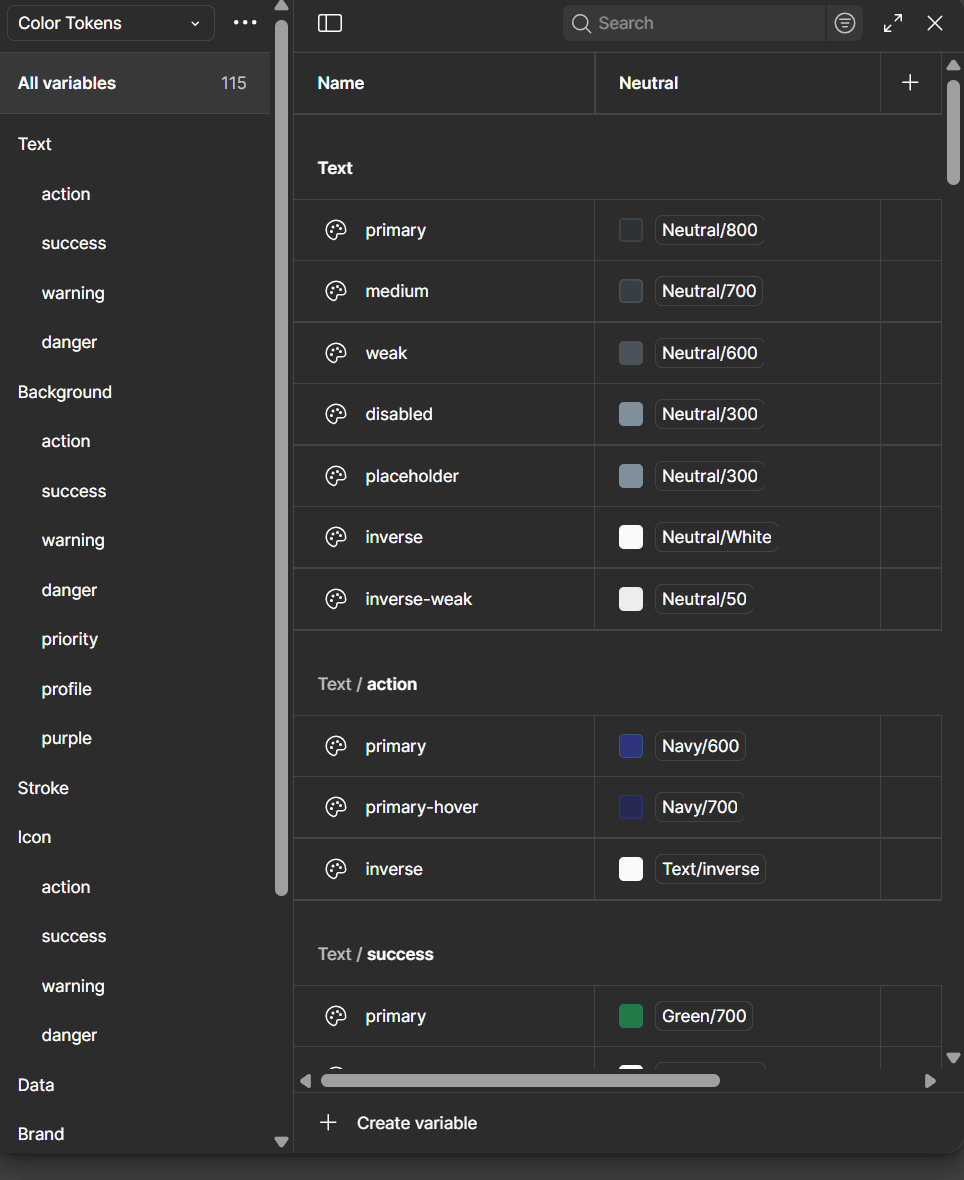
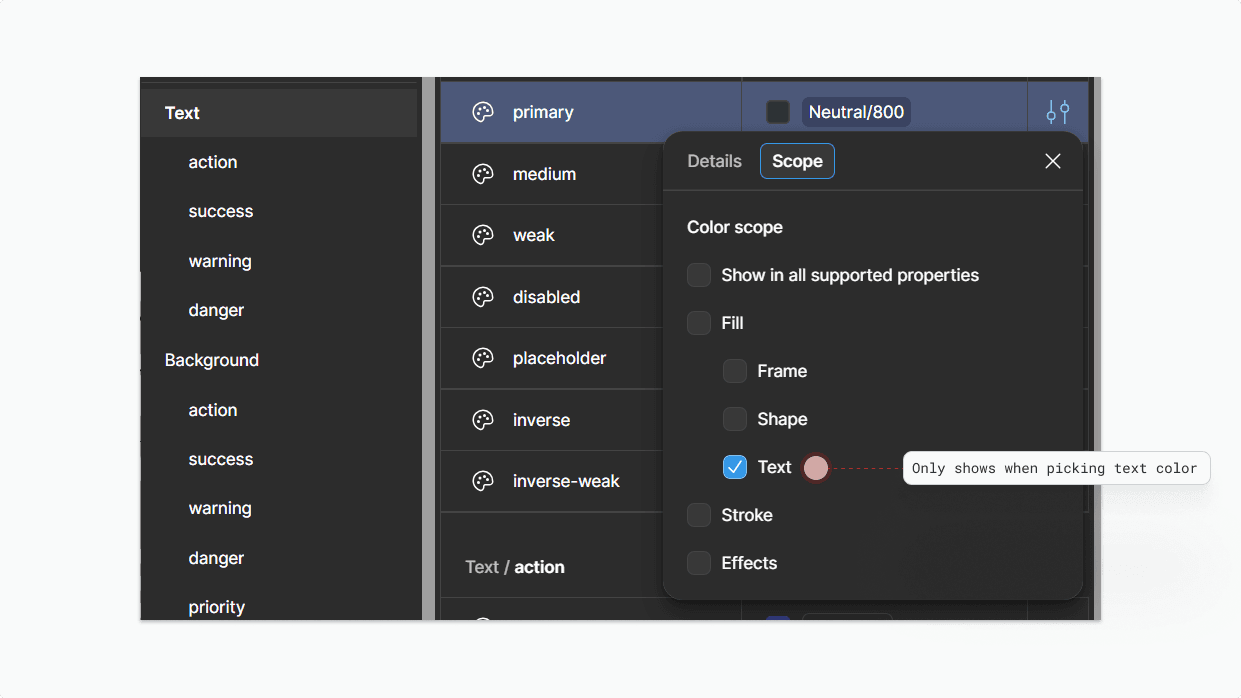
Figma variables were just announced as I was building this design system. I had experience using CSS variables so this was really easy to learn and understand. I created a system for foundation colors and semantic colors; the latter being the only variables exposed to designers and developers. To further optimize the color implementation, I devised a system for specific class colors, such as text, background, and stroke. By configuring the variables in a way that only displays the relevant color options when selecting certain frames, I facilitated the quick identification of the appropriate color class for text, background, stroke, etc. application in both design and code.

A screenshot of the Figma variables panel showing the grouping system I created

Components

All components were rebuilt with auto-layout, variants for different interactive states, properties, documentation, and a link to Coda with our expansive documentation

Table Component

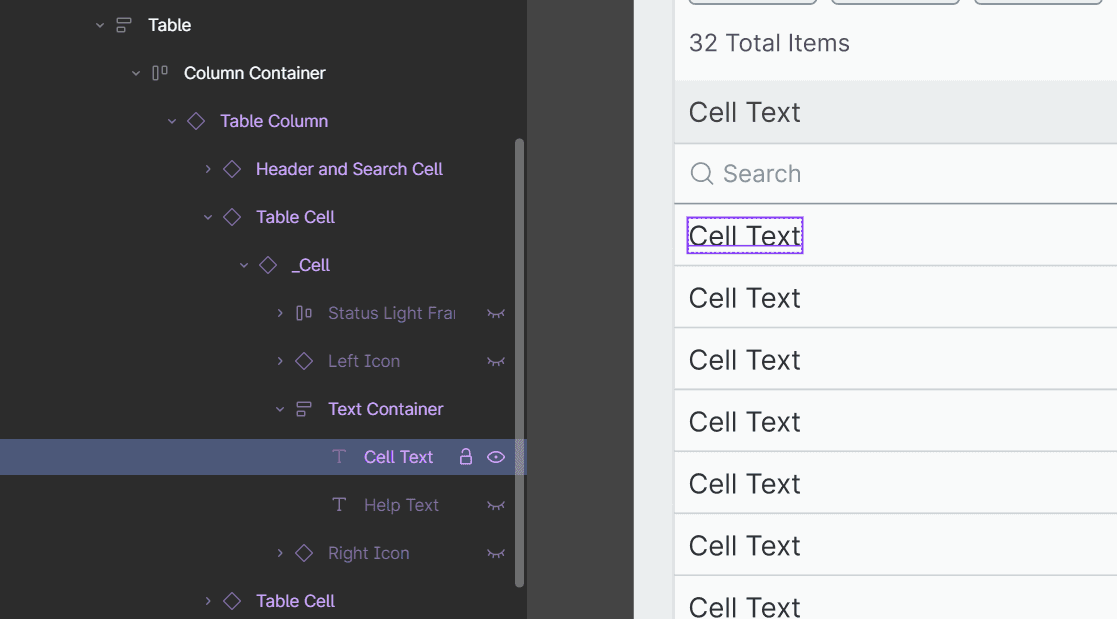
The most challenging component to build was the table. Tables are built using many different atoms and molecules: cells, columns, headers, and pagination just to name a few. The table also had to support many different types of cells and cell heights.

I came up with a solution that uses 5 main components that solve all of the challenges when building a table. These components are broken up to easily identify and bulk update different parts. You can easily update a whole column to display a tag, update the row heights for all cells to allow 2 lines to display, or adjust the table to show a different amount of records.

Impact

The system transformed how our teams worked:

  • Designers could build features faster and with fewer errors

  • Developers implemented features directly from coded components, drastically reducing implementation and QA time

  • New team members and non-designers could use the system confidently thanks to documentation and guidelines

  • Stakeholders reported more consistent, higher-quality products across business units

Key metrics:

  • Reduced the number of colors from ~300 to ~50, consolidating across business units while maintaining brand integrity

  • Merged 5 Figma files into 2, decreasing clutter and file size by 70%

Reflection

Leading this project fresh out of college taught me the power of ownership, structured decision-making, and documentation. I’m proud that the system is scalable, easy to use, and widely adopted.

If I were to rebuild it today, I’d implement additional QA checkpoints at the end to catch small bugs before launch but the feedback system I created ensured continuous improvement. Most importantly, I learned that a design system is more than a library of components; it’s a tool for clarity, efficiency, and empowering teams to create better products.

There are many more details on this effort. Please reach out if you have any questions!

Read Case Study

Media Client Portal

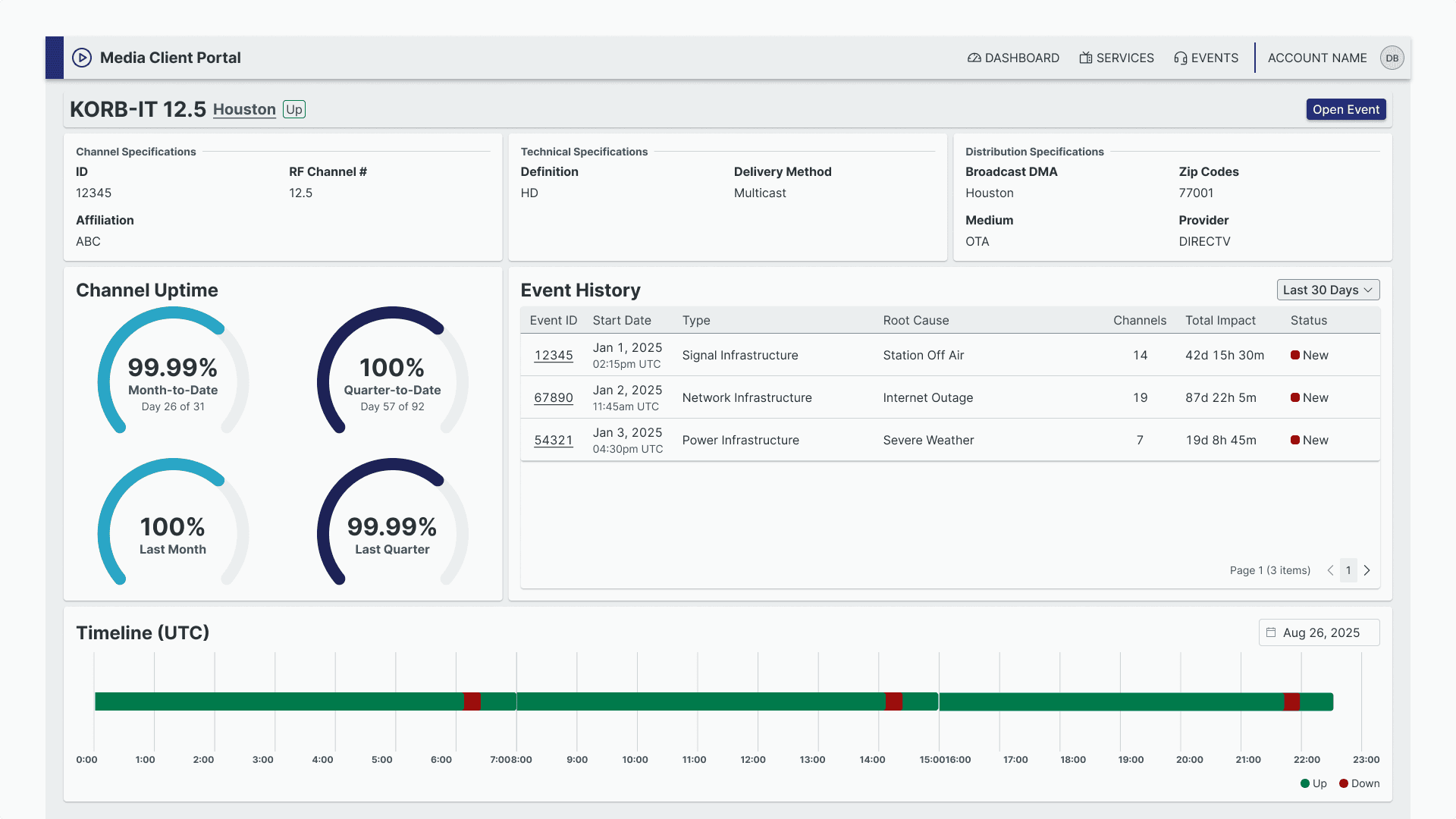
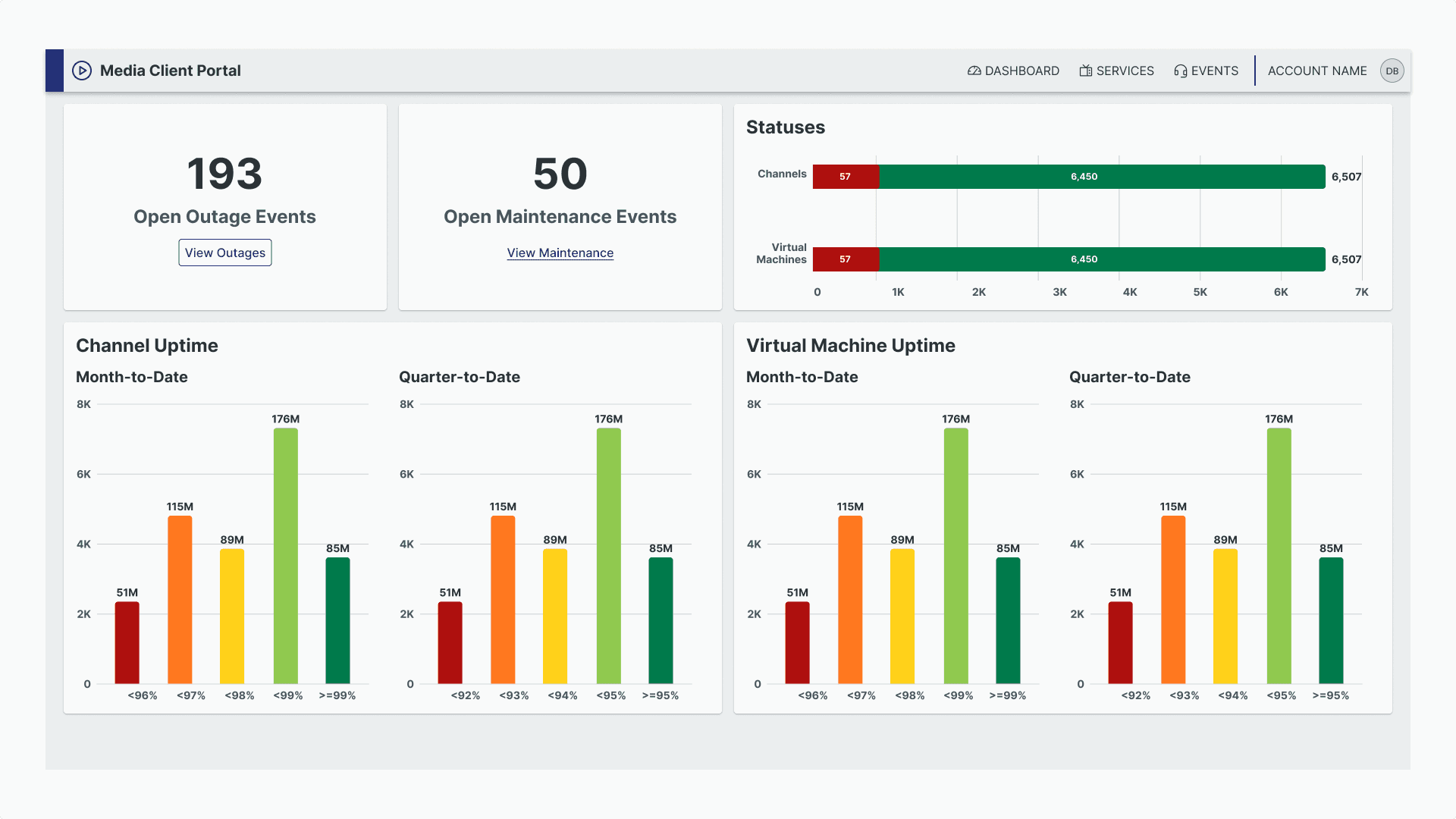
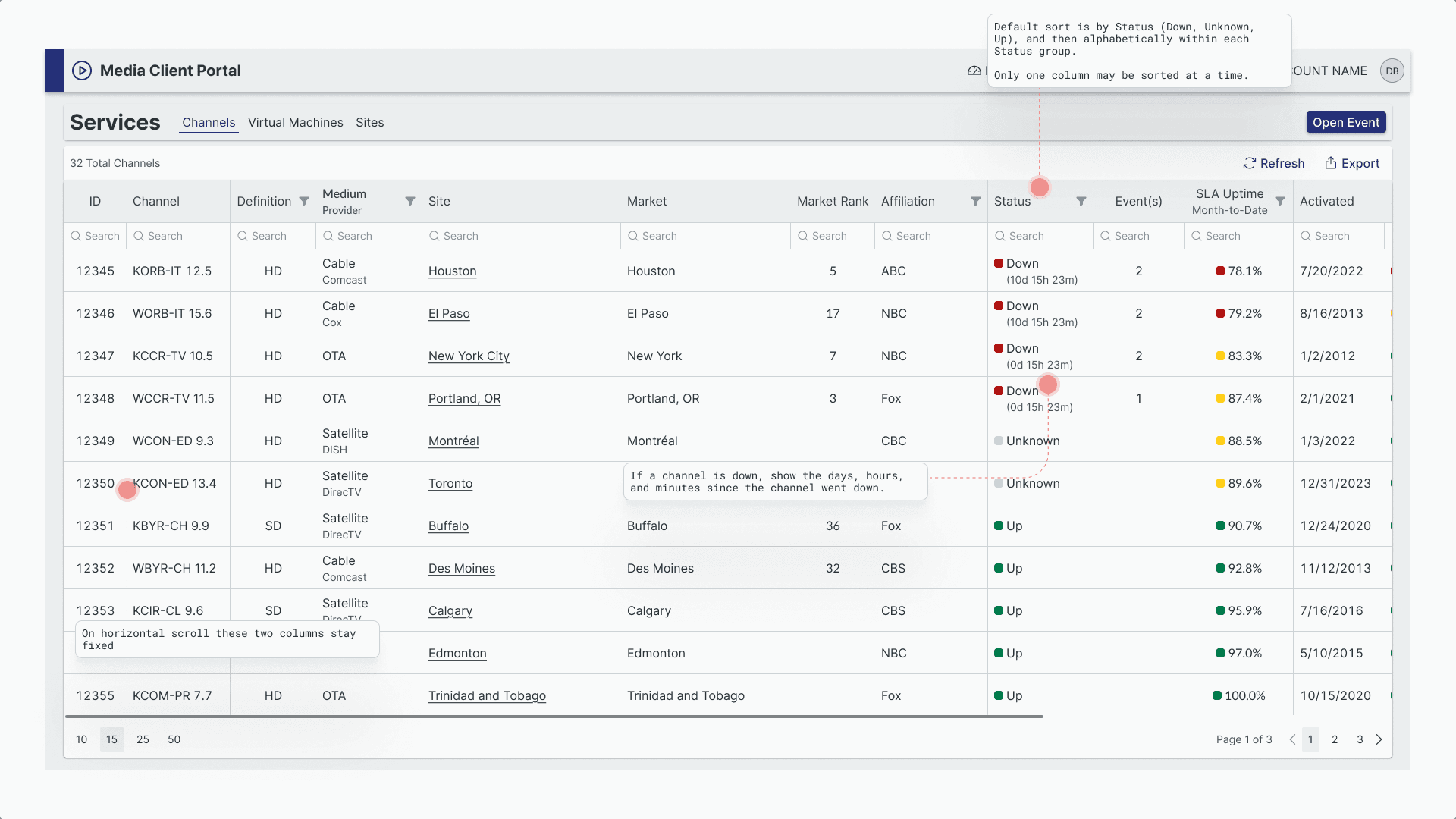
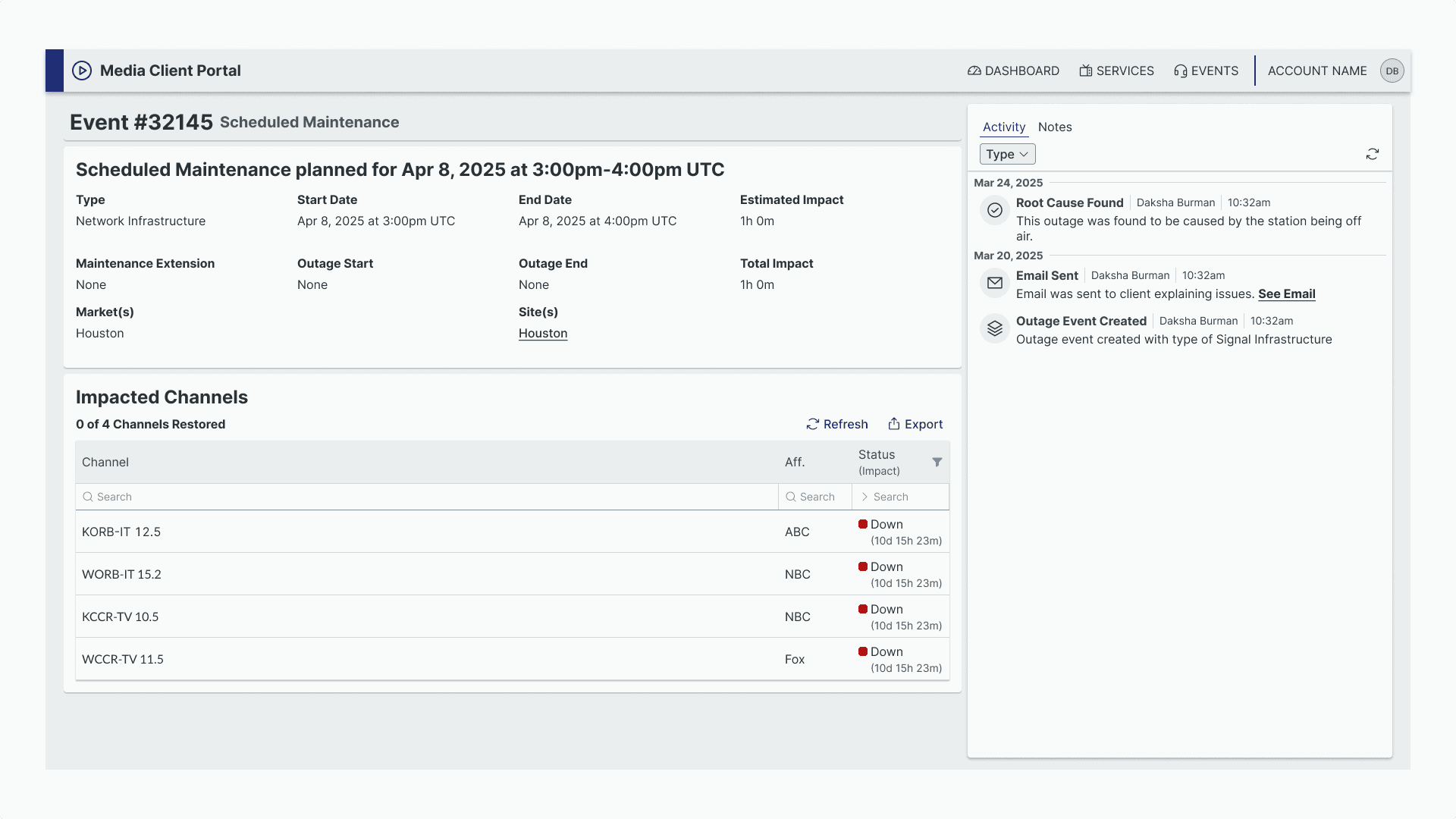
A snapshot of a the channels dashboard page in a media client portal

I redesigned a media client portal that allows clients to manage and view information about their sites, channels, virtual machines, and events affecting their assets. This project involved consolidating two outdated systems into a unified, scalable solution that serves multiple client types with different needs.

My Role

I worked as the lead UX designer alongside our media team stakeholders and developers over a 5 month timeline. I took over the project after another designer had created an initial solution that was too complex and didn't address actual user problems.

The Problem

Technical Debt

Our media clients were struggling with two separate, outdated systems that were several years old, incredibly difficult to maintain, and had inconsistent interfaces with unreliable data. Worse yet, we could no longer support these applications with our current technology stack which forced us to rebuild.

Band-Aid Features

One of the systems had been originally built for a single client, then modified over years to serve multiple clients. This created a patchwork of features that didn't serve anyone well. Each new client requirement resulted in another workaround rather than a thoughtful solution.

Business Model Shift

Our company was also transitioning to start providing single assets to multiple businesses, meaning we needed a system that could elegantly show complex relationships between all of the potential assets, which is something the old systems couldn't handle.

Research and Goals

Researching Through Internal Stakeholders

Since I couldn't access end users directly, I conducted interviews with our internal team members who interact with clients daily. This revealed two distinct user groups: account managers who needed high-level portfolio overviews, and technical users who required detailed asset information and relationship mapping.

Design Goals

Based on the insights I gathered through research, I established clear success criteria:

  • Create consistency across all asset views so important information is quickly identifiable

  • Build holistic connections where all assets (sites, channels, VMs) are clearly linked and relationships are visible

  • Surface critical event information including upstream/downstream impact during outages

  • Serve multiple user types with appropriate levels of detail for each audience

  • Support multiple clients with configurable features and responsive design

My Process

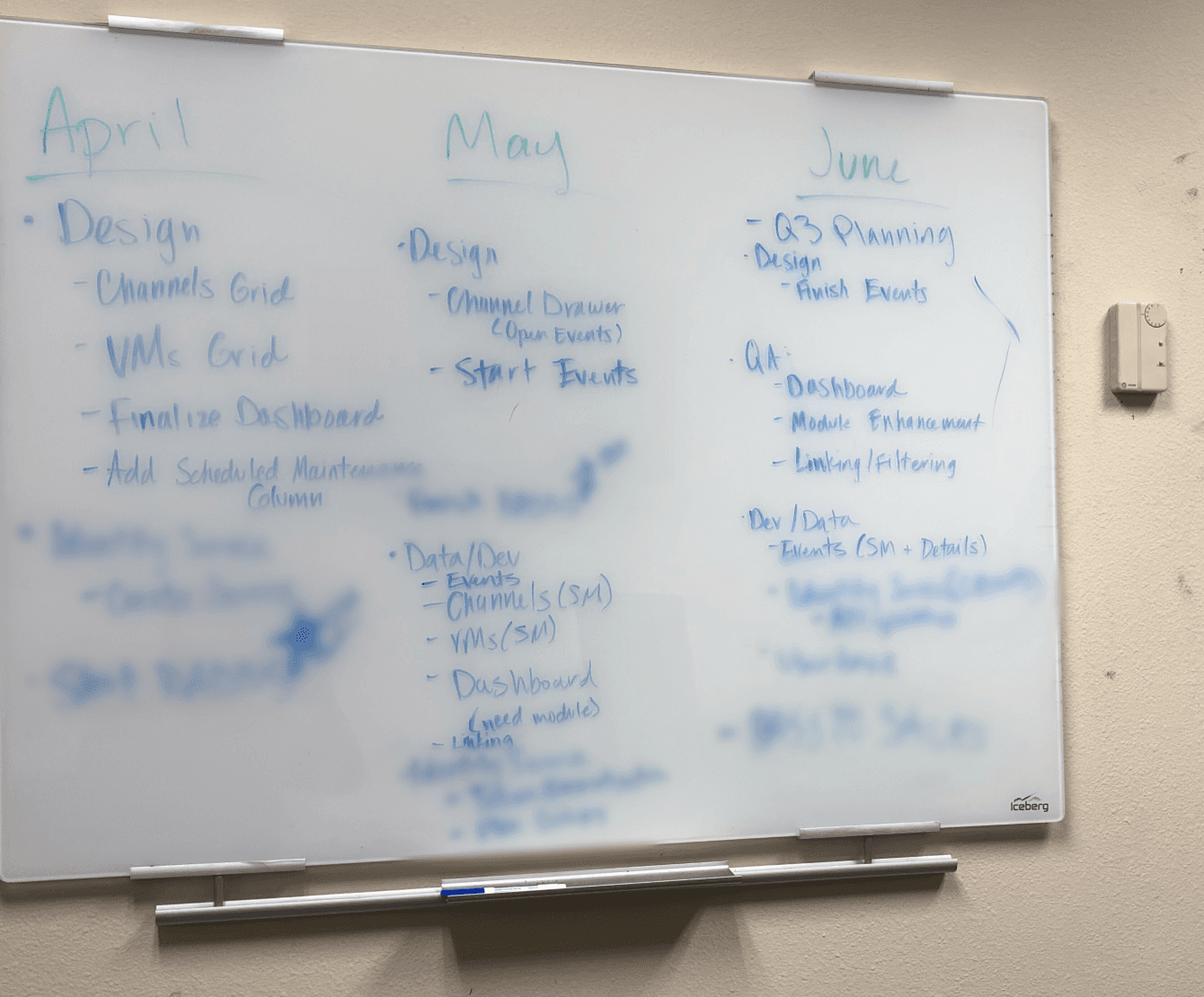
I began with a comprehensive research and audit of the existing designs and user needs, identifying what was salvageable and what needed complete rebuilding by working closely with the media team. From there, I broke the solution into phased development cycles, organizing main features into manageable sprints that could be tackled incrementally.

A whiteboard showing a monthly breakdown of work planned. Some parts are blurred because of proprietary information

For each phase, I created high-fidelity wireframes and established feedback loops with the team before any development handoff, ensuring alignment and catching issues early. As we built and learned more about the holistic system needs, I continuously iterated on the designs, refining the experience based on real implementation challenges. Throughout this process, I maintained multi-client considerations by creating wireframe variations that showed how features could be displayed or hidden for different client needs, complete with detailed annotations for responsive behavior.

The Solution

Dashboard and List Pages

I created a centralized dashboard that gives account managers immediate visibility into their entire asset portfolio with key metrics and status indicators at a glance. Another feature is that the graphs are clickable which will take the user to the corresponding list page with the correct filters applied.

Detailed Asset Pages

I created detail pages that serve both of our defined user types simultaneously by combining technical specifications for power users with visual charts and graphs for account managers. Information hierarchy ensures each audience can quickly find what they need.

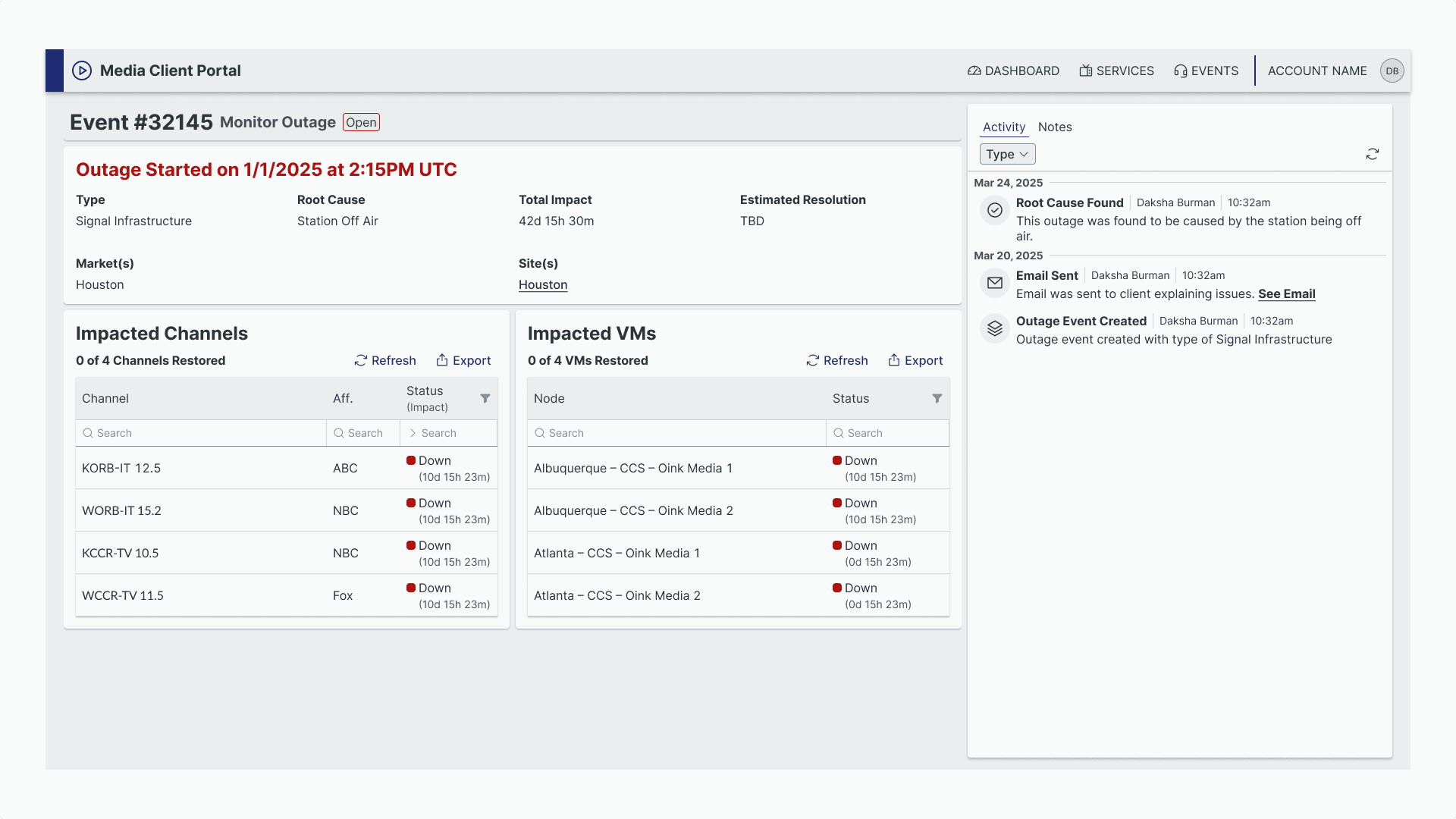
Comprehensive Event Management

Solved the critical challenge of event visibility by:

  • Separating outages and maintenance into distinct categories and pages

  • Adding event columns and history to each asset/details page

  • Surfacing vital information including NOC team activity logs

  • Showing impact relationships with charts about affected assets

  • Enabling direct communication with NOC teams through messaging features

Results and Impact

The new portal delivered measurable improvements:

  • Increased user engagement across the client portal

  • Successful onboarding of new clients into the unified system

  • Improved willingness of users to interact with our portal for asset information, event management, and team communication

  • Consolidated experience eliminating the need to use multiple outdated systems

Learnings and Reflection

This project taught me how complex media infrastructure relationships really are; understanding how sites connect to markets, channels, and VMs was crucial for designing intuitive information architecture. I also grew significantly in stakeholder collaboration and learned to present design decisions effectively to technical teams.

If I had to do things differently, I would have pushed harder for direct user research opportunities earlier in the process. While internal stakeholder interviews were valuable, getting client feedback during the design phase would have validated assumptions more quickly and potentially uncovered insights we missed.

Read Case Study

Construction Ordering Form

Portfolio Project 03

I designed an internal order form for our construction managed services team's sales staff, transforming a complex ordering workflow from client self-service to an efficient internal process that improved order accuracy and revealed valuable business insights.

My Role

I worked as the UX designer collaborating with my team leader who maintained direct communication with the business unit and sales team. I was responsible for adapting existing client portal functionality into an internal tool that met specific sales team requirements.

The Problem

Strategic Shift from Self-Service

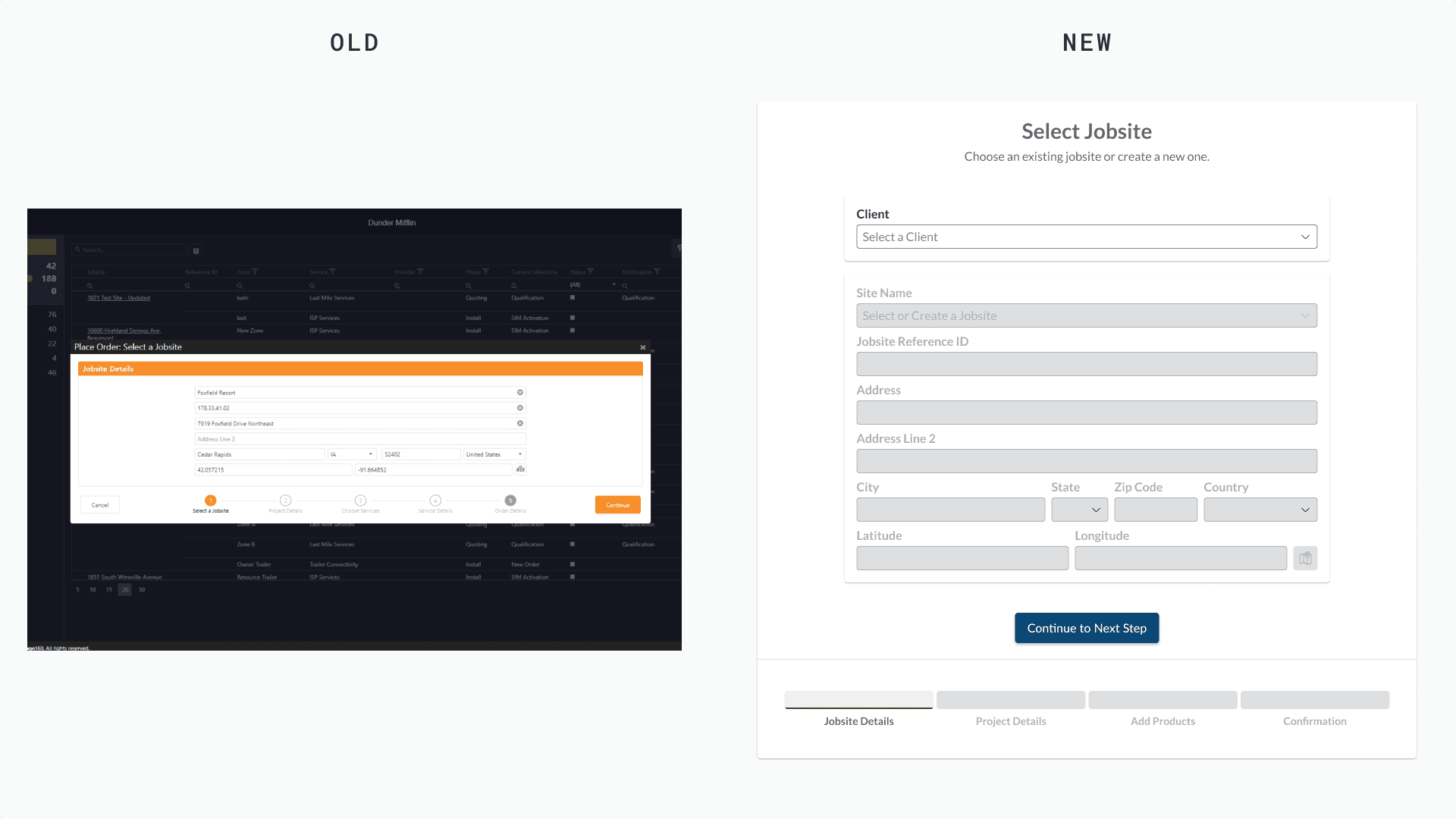
The construction managed services team made a strategic decision to stop allowing clients to order directly through our client portal. This meant the sales team needed a completely new way to process orders they received via email from clients.

Zone Management Breakdown

The existing client portal had poorly implemented zone management that was confusing and difficult to use. Since orders often involved multiple zones with different products, this was a critical workflow bottleneck that needed complete reimagining.

Product Management Challenges

The team was launching new products with different configurations and versions, but the existing system made it extremely difficult to add new products to order forms. This created delays in bringing new offerings to market.

System Integration Gaps

Orders weren't properly syncing with their business systems, creating manual work and potential errors in their sales pipeline management.

Research and Goals

Stakeholder-Driven Requirements

Working through my team leader who had extensive communication with the business unit and sales team, I gathered clear requirements rather than conducting direct user research. This approach leveraged existing stakeholder relationships to ensure all problems and needs were properly identified.

Core Requirements

Based on stakeholder feedback, the new order form needed to:

  • Enable efficient order placement by sales team processing email requests

  • Support new products the team was launching, including version variations

  • Link orders to business systems for proper pipeline management

  • Handle multiple products and zones within a single order seamlessly

My Process

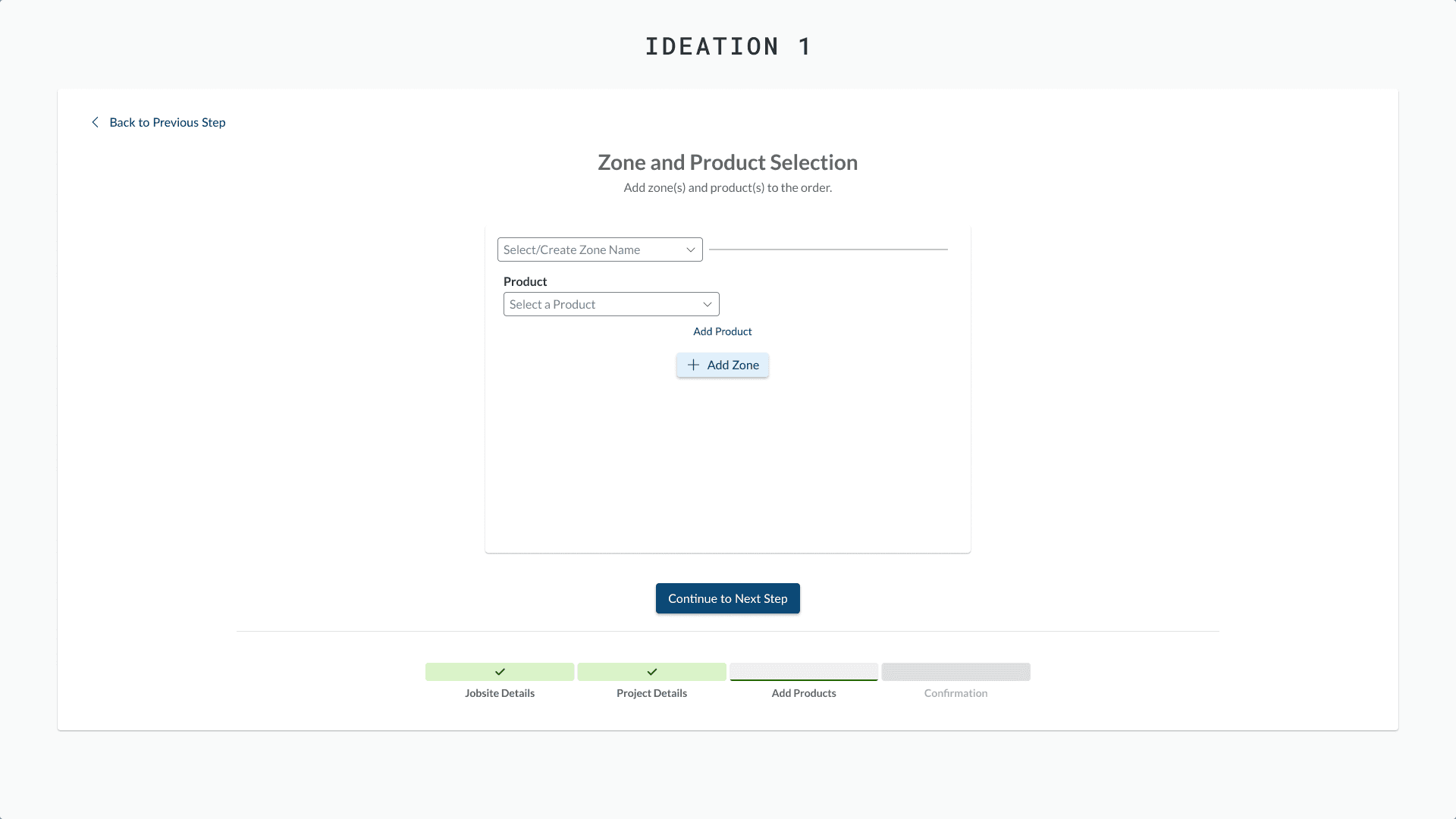
I began by analyzing the current client portal to identify components that worked well, then adapted them for an internal sales team perspective rather than the client viewpoint they were originally designed for. For the critical zone management challenge, I went through multiple iterations of high-fidelity designs, initially taking inspiration from applications used by our other business units before developing a completely custom solution.

Throughout the design process, I maintained detailed documentation of iterations and design scraps within my Figma files, allowing me to reference previous concepts and combine successful elements from different iterations into the final solution.

The Solution

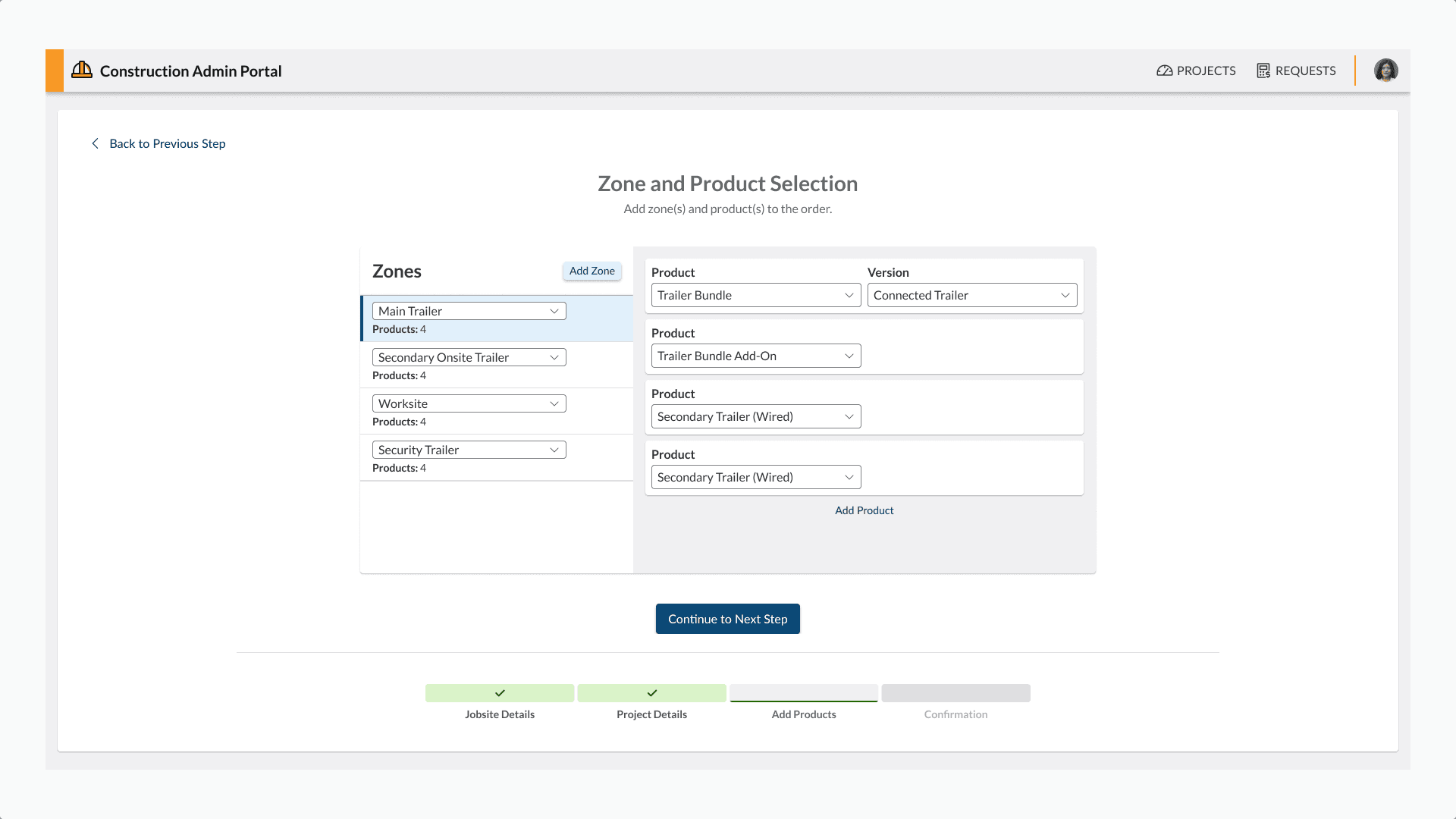
Product and Zone Selection

Intuitive Zone Management Sidebar

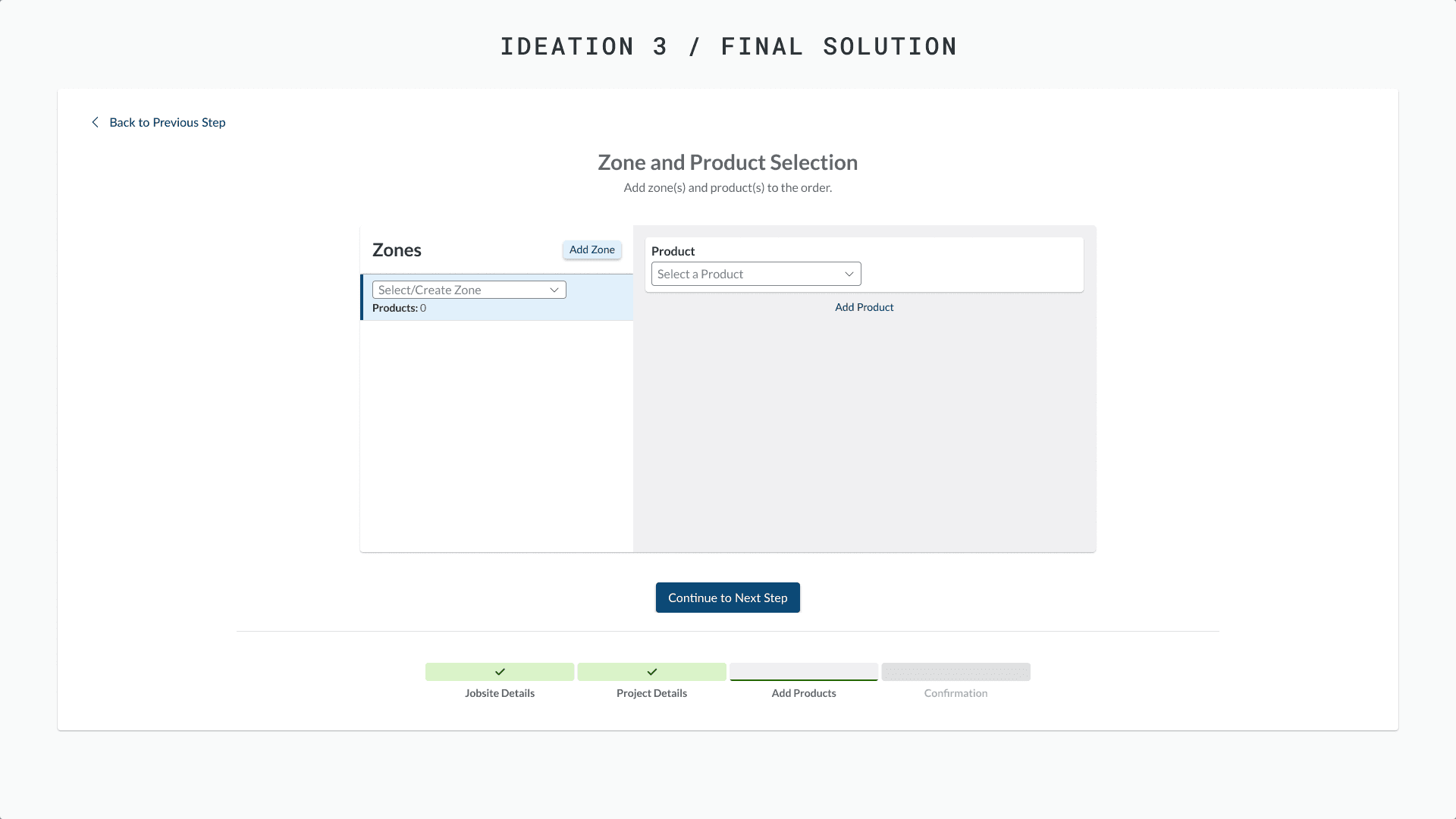
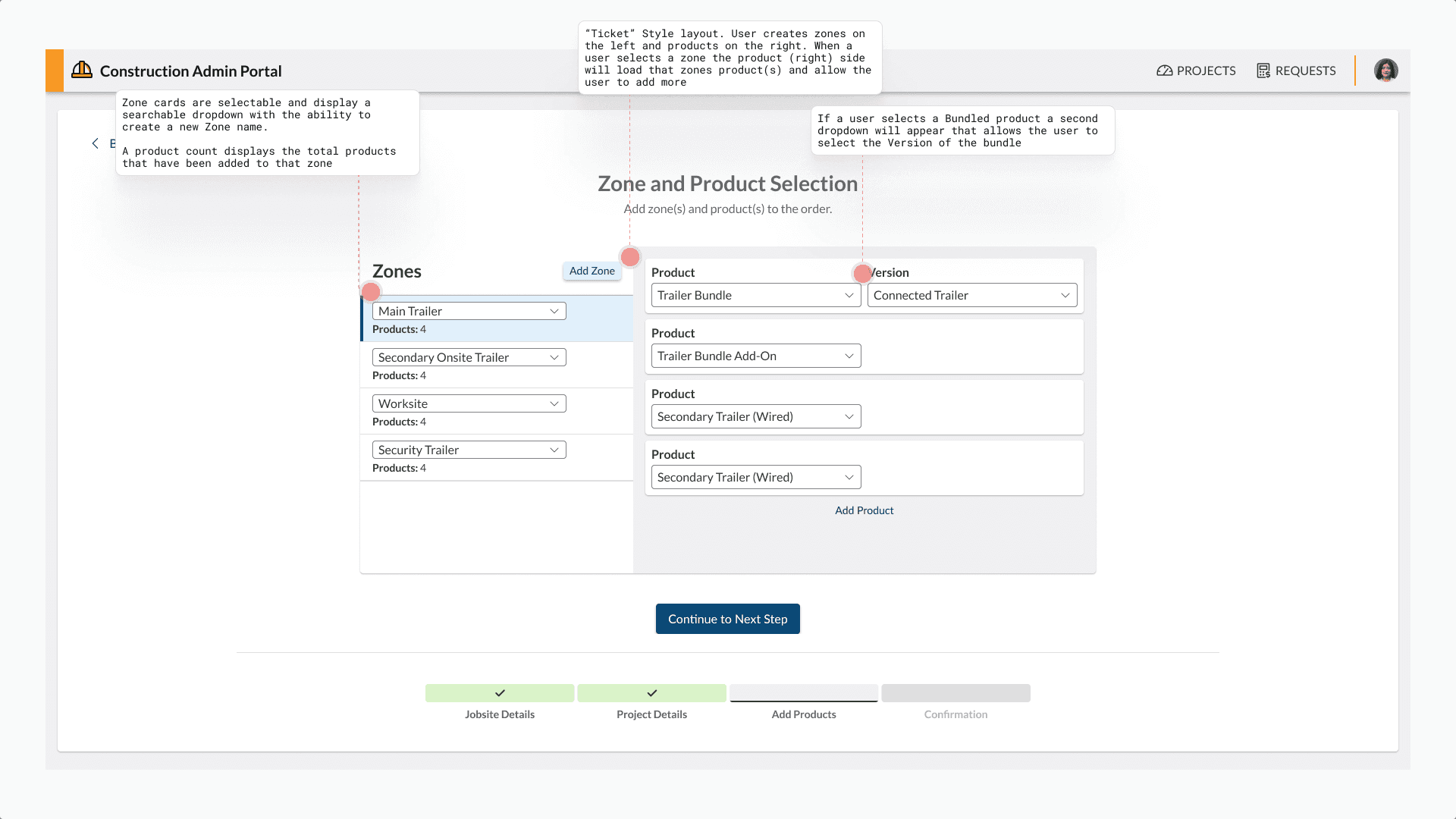
Created a dedicated sidebar that exclusively handles zone management, clearly laying out how to add zones and set zone names by either selecting existing zones or entering custom names. Each zone displays as a card showing the number of products added, with easily recognizable selected states so users always know which zone they're working with. The sidebar also includes simple delete functionality for removing unwanted zones.

Distinguished Product Interface

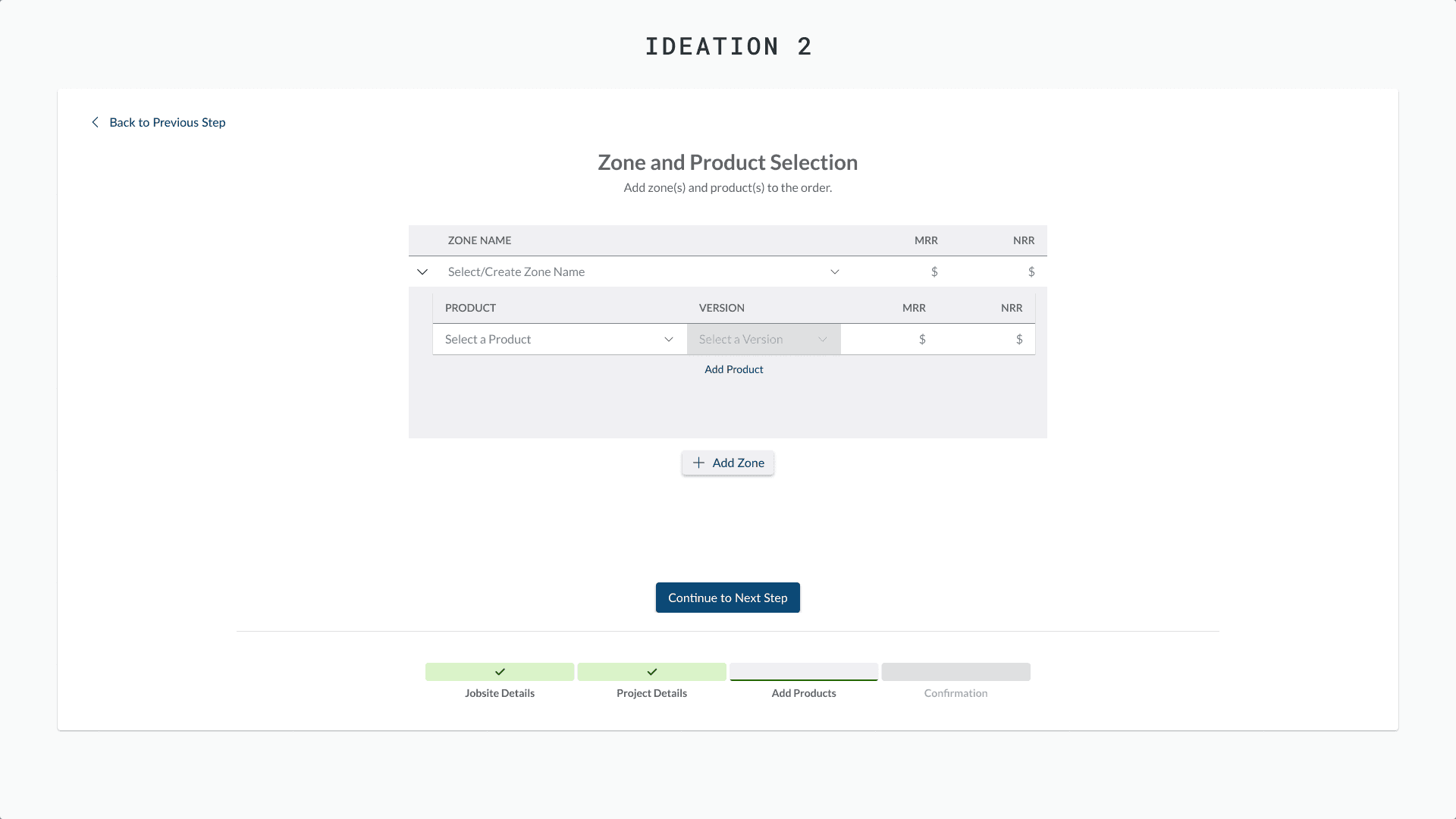
Designed the right-hand side with a distinct background to clearly differentiate the product area from the zone sidebar. The interface starts with an empty product card containing a select box, and once a product is added, users can easily add more products to the same zone.

Progressive Product Configuration

Solved the new product version challenge with a consistent UI that uses progressive disclosure: users first select a product from a dropdown, then if that product requires version selection, a second dropdown appears in the same card. This approach handles both simple products and complex versioned products with the same intuitive interface.

Comprehensive Order Summary

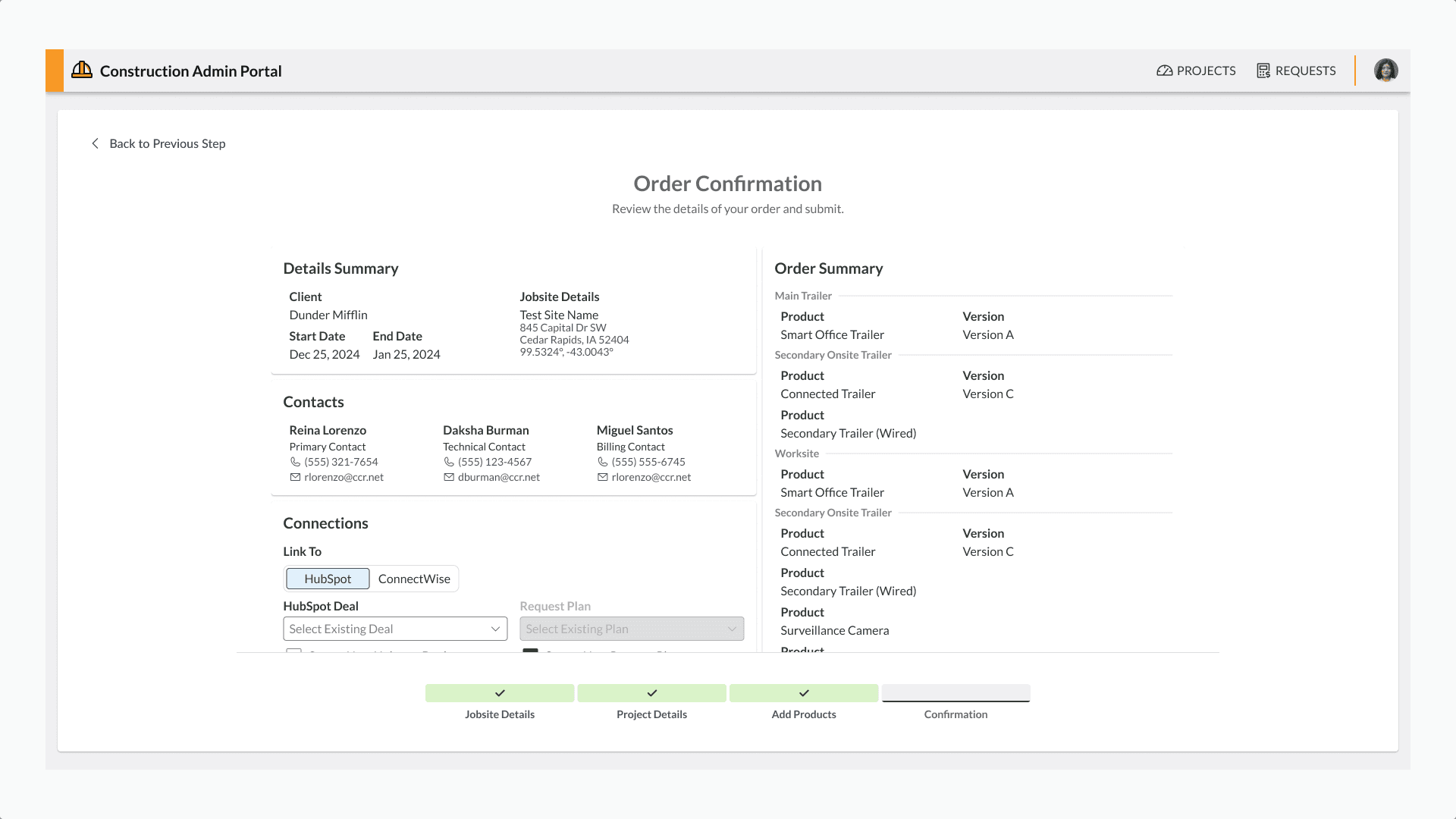
Solved the complex challenge of displaying multi-zone orders with varying products by creating a receipt-style layout on the order summary page. This design clearly organizes zones as primary sections with all associated products listed underneath each zone, making it easy for sales staff to review and verify orders before submission. Additionally, I added business system integration fields to ensure orders sync correctly across all business systems without manual intervention.

Results and Impact

The new order form delivered measurable improvements:

  • Orders now consistently followed the business unit's requirements, reducing errors and rework

  • Orders began syncing correctly across systems with the inclusion of HubSpot and ConnectWise fields, eliminating manual data entry

  • The new form revealed insights about products commonly ordered together for the same zones, allowing the team to adjust product offerings to better match client needs

Learnings and Reflection

This project strengthened my ability to quickly adapt existing designs into solutions that address critical business needs rather than starting from scratch. I also improved my design process by maintaining comprehensive documentation of iterations and design explorations within Figma files, which proved invaluable for referencing previous concepts and combining successful elements from different iterations.

Read Case Study

Vertical Asset Management

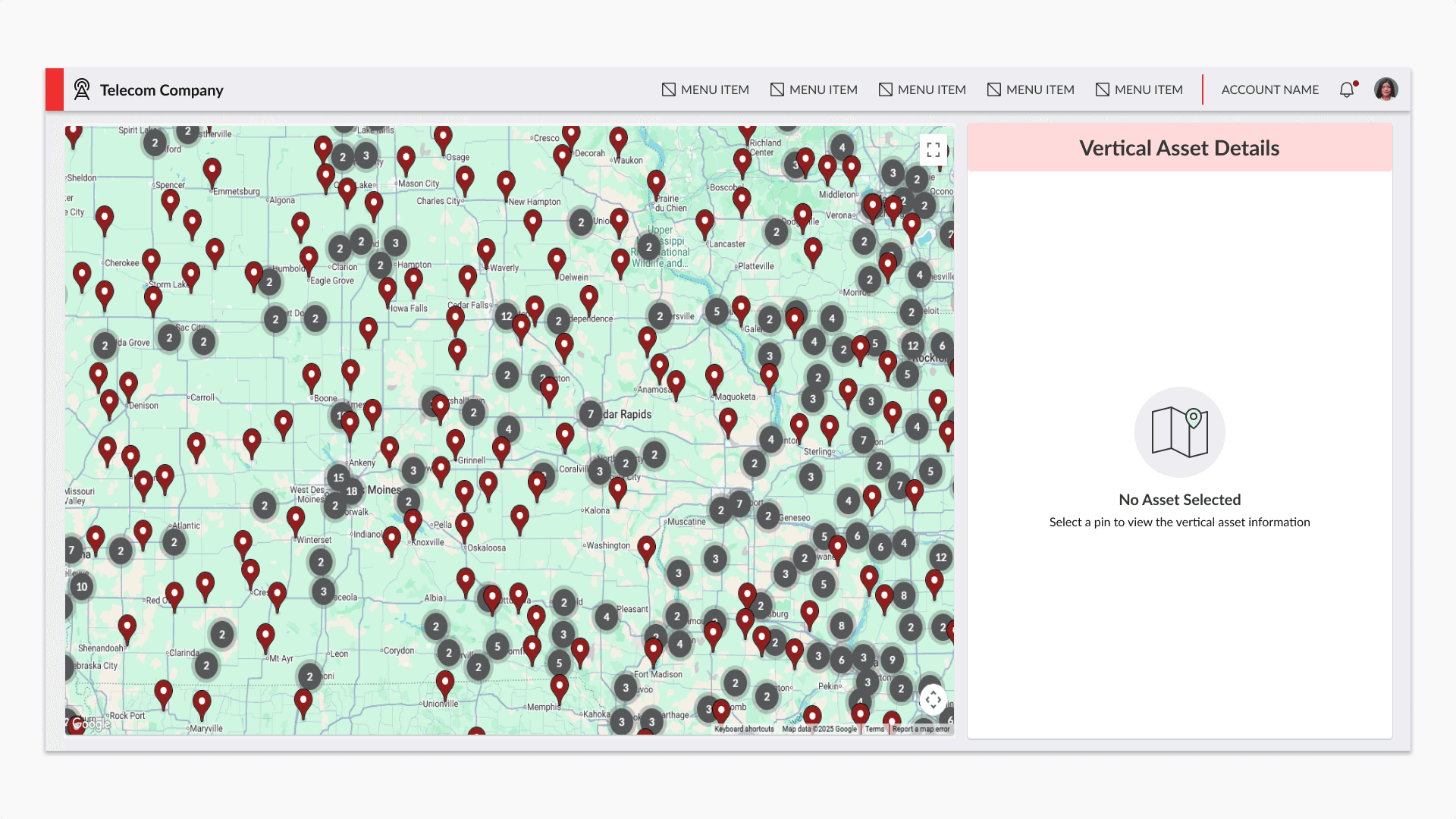
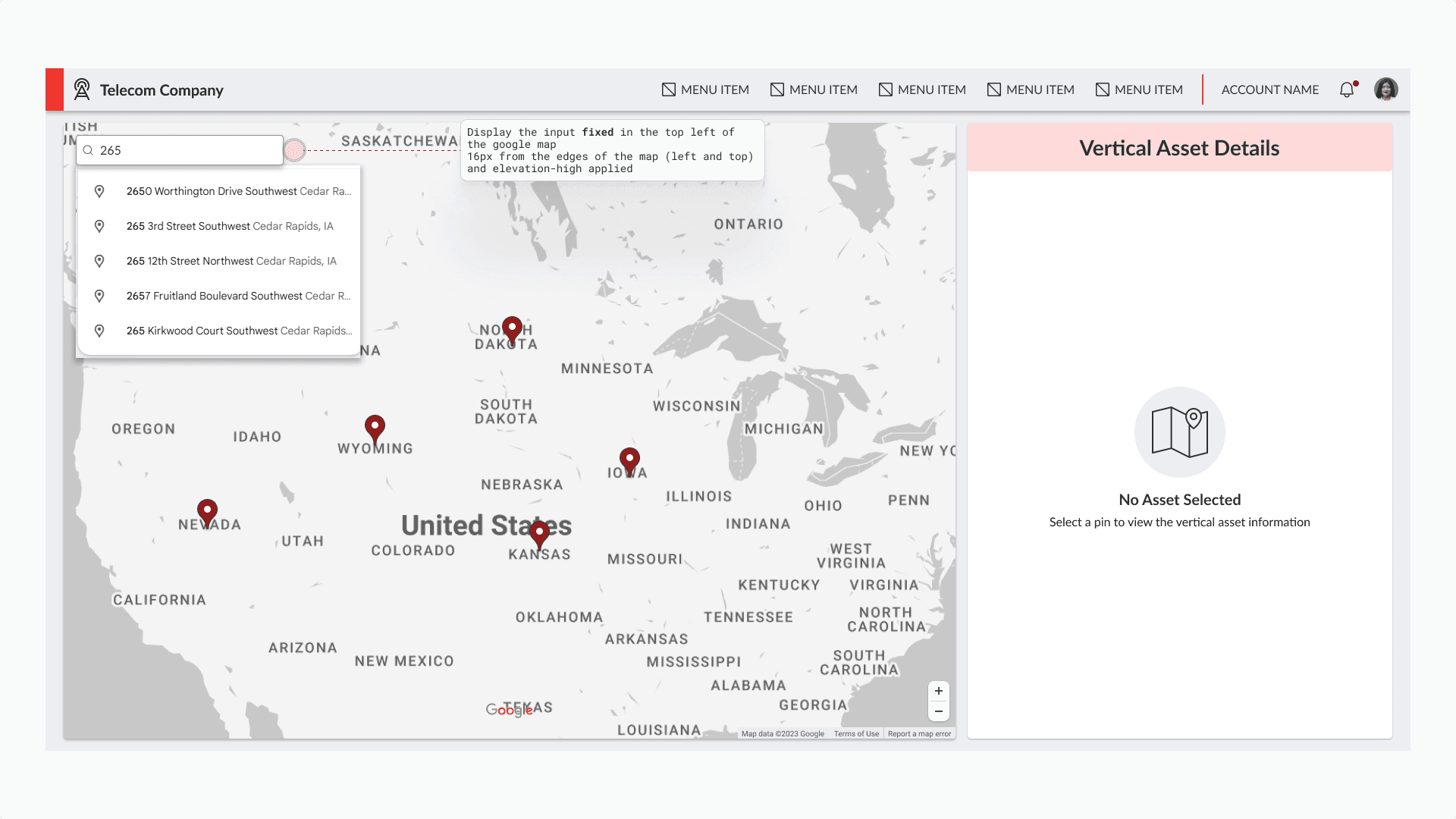
The Engineering Solution team in our telecom business unit needed a way to visualize and access information about thousands of vendor-owned vertical assets. We needed to provide a solution in a week using new technology and AI, that takes them out of spreadsheets and into a visual map.

The Problem

  • The team was managing thousands of vertical assets using spreadsheets from multiple data sources

  • Each vendor provided different data structures and fields

  • No spatial visualization made it difficult to quickly identify nearby assets

  • Timeline constraint: Solution needed to be delivered in one week

Success Criteria

  • Create a usable map showing vertical asset locations

  • Display all relevant data when an asset is selected

  • Deliver within the one-week deadline

  • Maintain good UX despite aggressive timeline

The Process

Technical Foundation

This project presented a unique challenge: each data source had different fields and structures. We made the decision to use MongoDB for the first time as a team, which provided the flexibility needed to handle varied data schemas. While this added a learning curve during an already tight timeline, it was essential for the solution to work across multiple vendor datasets.

Design Exploration

I explored multiple approaches and consulted with other designers and stakeholders:

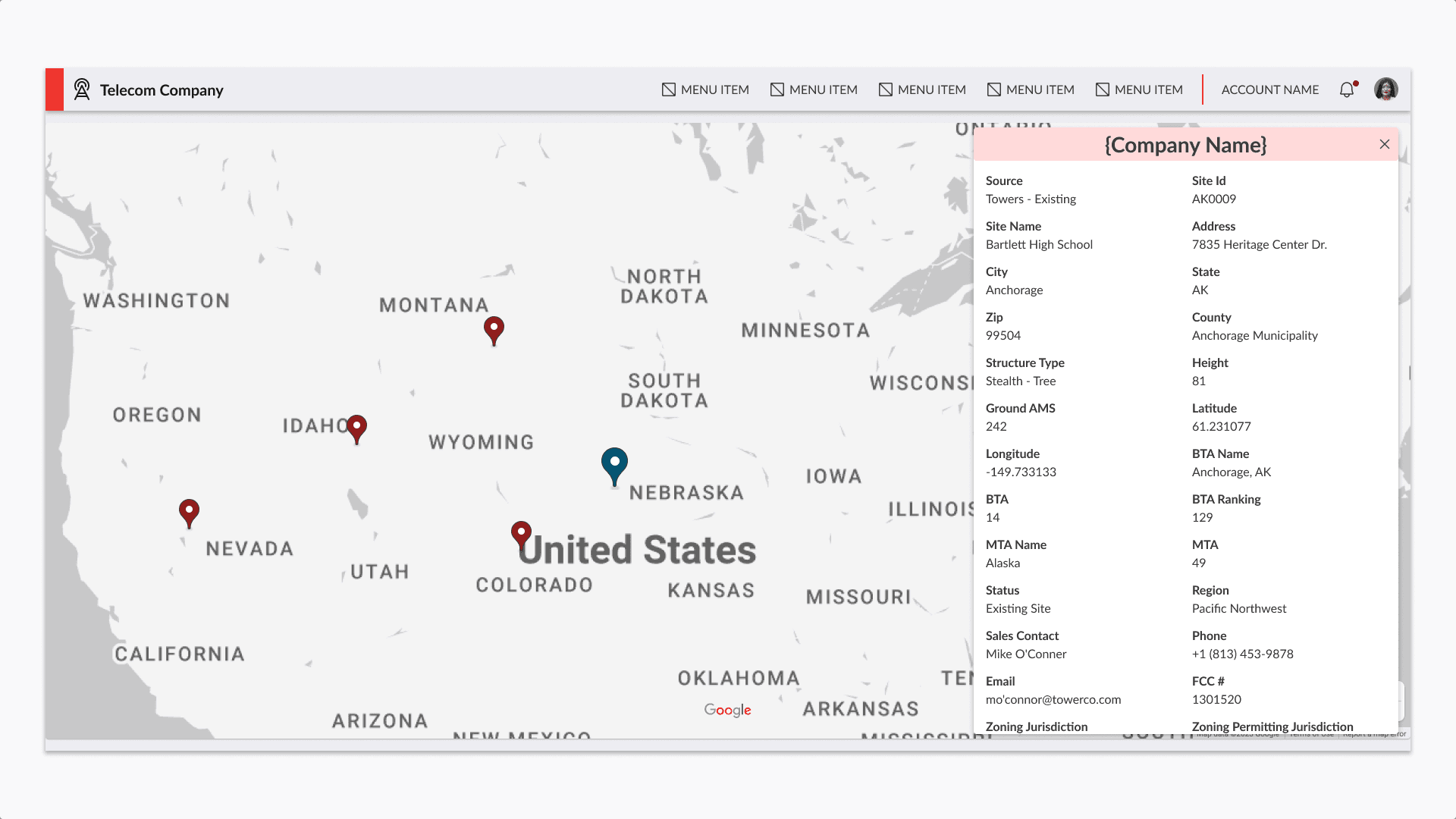
Option 1: Floating Panel (Flashy)

A full-screen map with a floating sidebar that appears on-demand when an asset is clicked. This would maximize map visibility and create a more modern, dynamic interface.

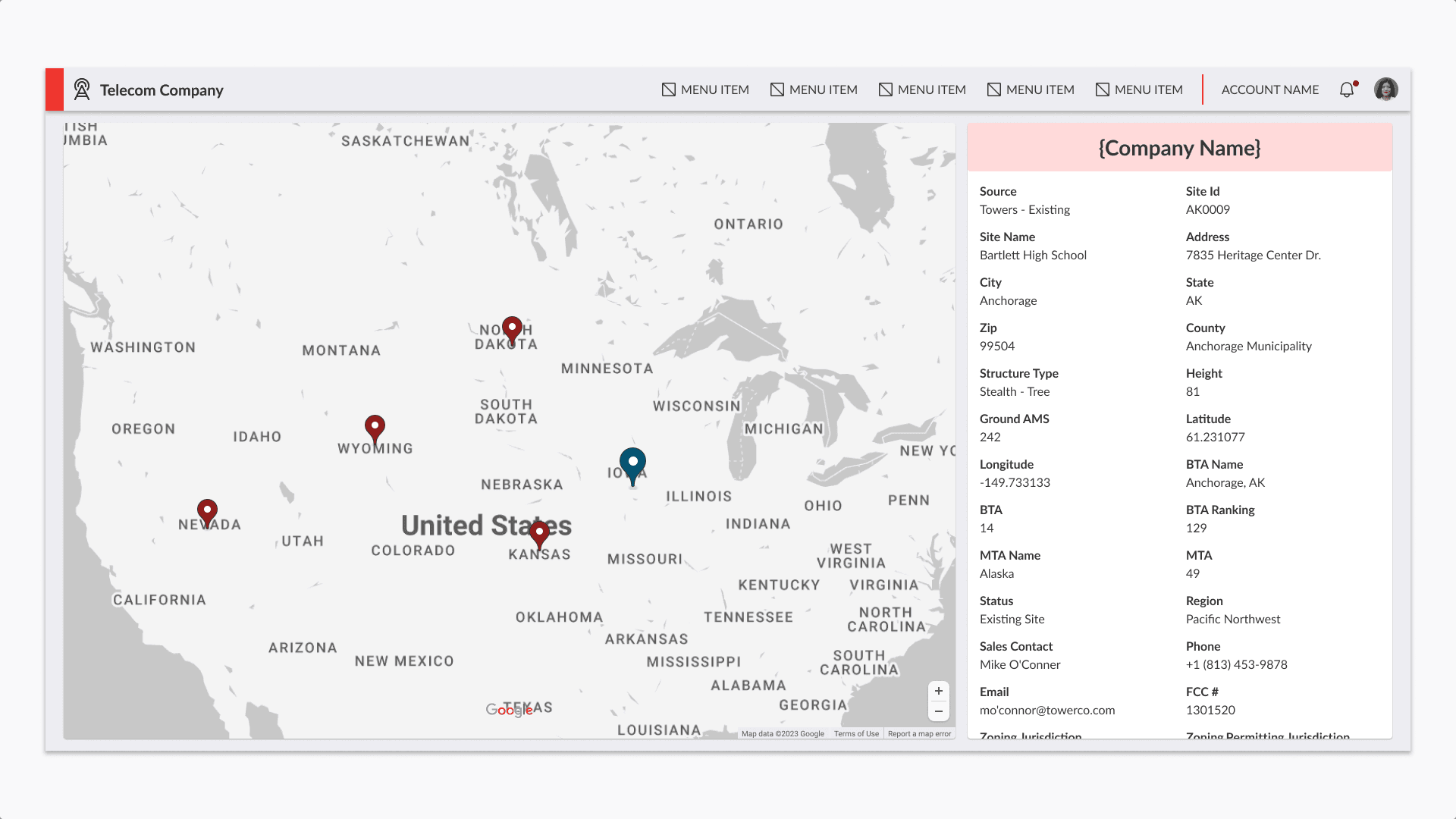
Option 2: Fixed Sidebar (Practical)

A persistent panel on the right side of the screen that displays asset information when a pin is selected.

The Decision

Given our one-week deadline and the technical complexity of implementing MongoDB for the first time, I chose the fixed sidebar approach. While the floating panel was more visually appealing, the fixed sidebar was:

  • Much faster to implement

  • Provided better UX

  • Solved the core business need effectively

I also had to make peace with deprioritizing search and filter functionality for v1, despite knowing these would be valuable features. The priority was solving the main problem: getting asset data out of spreadsheets and onto a map.

The Solution

Map Interface

  • Google Maps integration for familiar, reliable mapping

  • Pin markers for each vertical asset location

  • Clustering to manage thousands of data points at higher zoom levels

  • Responsive pin sizing based on zoom level

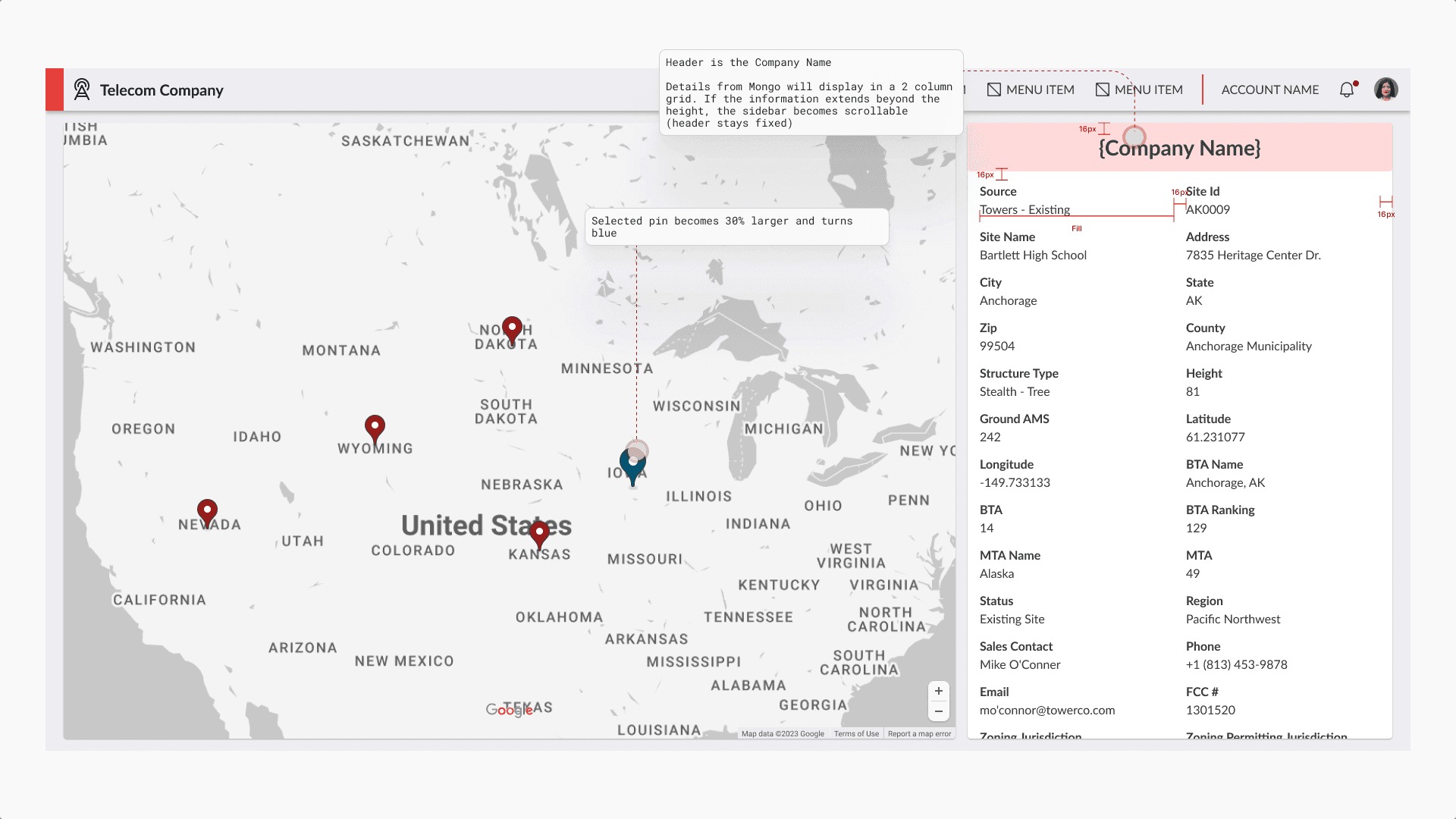
  • Active state highlighting - selected pins change color for clear visual feedback

Data Display Panel

  • Fixed right-side panel for consistent information access

  • Site name header for quick identification

  • Flexible 2-column grid layout that adapts to the data MongoDB provides

  • This design accommodated the varying data structures from different vendors without requiring custom layouts for each source

Development Approach

Our front-end developer used Cursor AI extensively to accelerate development. As a UX Designer with ownership in front-end code quality, I had to embrace a personal goal: accepting higher AI usage and letting go of perfectionism to ship v1 quickly.

Results

Immediate Impact

✅ Delivered on time - Solution shipped within the one-week deadline
✅ Daily usage - The tool is used almost daily by the Engineering Solution team
✅ Positive feedback - Users expressed satisfaction with the solution
✅ Problem solved - Team moved from spreadsheets to an interactive, spatial tool

Post-Launch Feedback

We conducted feedback sessions after launch, which generated a backlog of future enhancements. The most frequently requested features were:

  • Search functionality - Ability to search for specific assets by name or identifier

  • Filters - Options to filter assets by vendor, type, status, or other attributes

These requests validated our v1 prioritization decisions. We deliberately left these features out to meet the deadline, knowing we were solving the core business need first.

Learnings & Reflection

AI-Assisted Development

Using Cursor AI was a double-edged sword:

Issues Encountered:

  • AI would sometimes rewrite code that was already correct and met our standards

  • It added its own styling that conflicted with our design system

  • It recreated code that already existed in the project

  • Changes occasionally affected other pages of the application

Key Learnings:

  1. More specific task documentation needed - I wrote tasks with a specificity between what I'd give to senior and junior developers. Being more detailed would help both the developer and the AI understand expectations.

  2. AI as a tool, not a solution - AI can accelerate development, but human oversight and code review are critical.

  3. Sometimes good enough is good enough - Shipping a functional v1 on time was more valuable than perfect code quality.

MongoDB Learning Curve

Implementing a new database technology during a one-week sprint added risk, but the flexibility it provided was worth it. The ability to handle varied data structures without schema migrations was essential for this use case.

Personal Growth

This project pushed me to let go of perfectionism in code quality and embrace AI as a practical tool for rapid delivery. As a designer with front-end development ownership, learning when to optimize for speed over polish was valuable professional growth.

Read Case Study

Periphery Design System

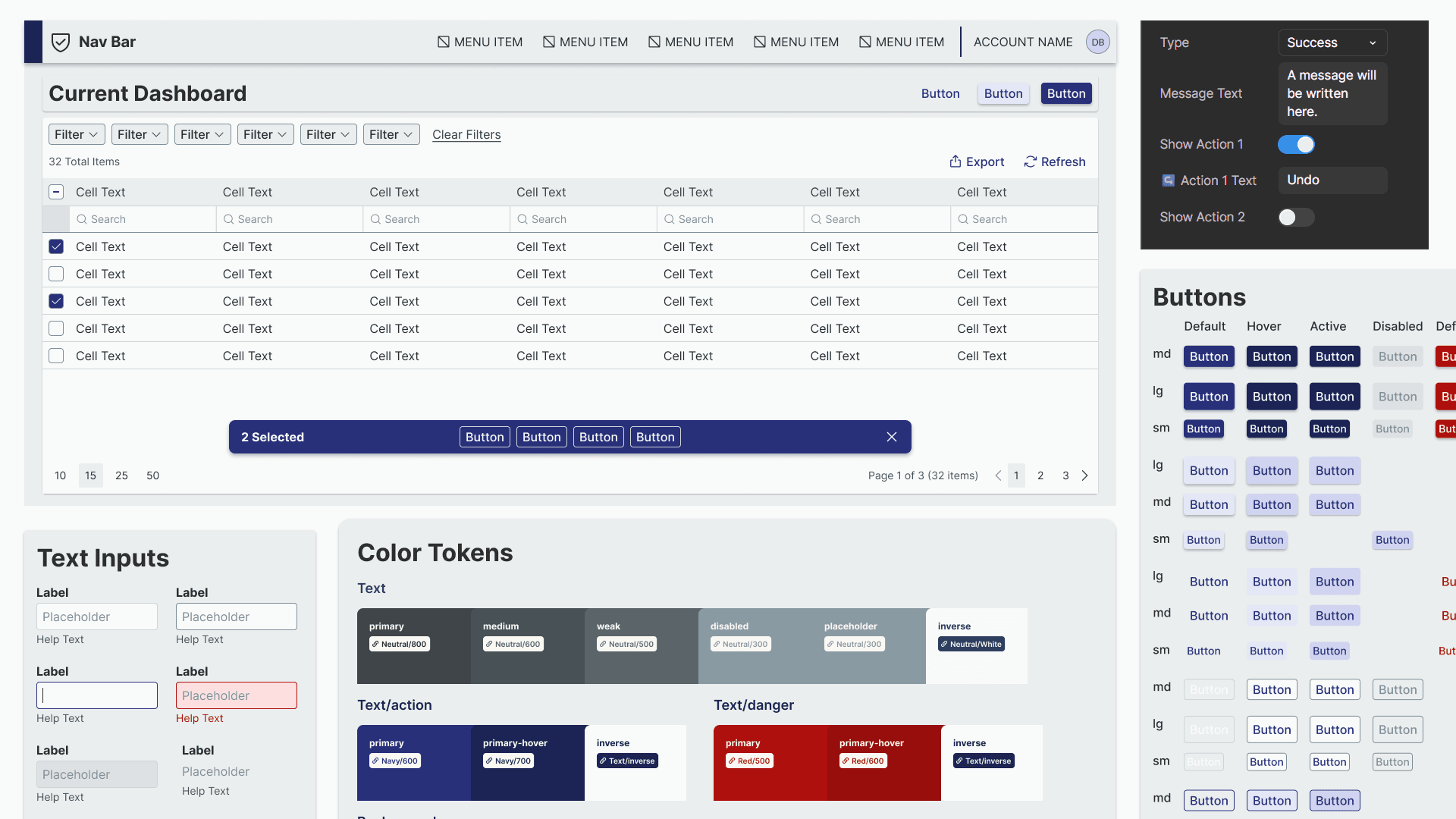
Showcase of Design System components

When I joined CCR, their design system was a source of friction rather than efficiency. There were too many colors, components were overly complex, and developers had to rebuild components every time they touched a new application. Features took longer to design and implement, and every project required extensive QA. My mission was to transform this fragmented, over-engineered design system into a single source of truth that made design faster, development easier, and experiences more consistent.

Understanding the Problem

I began with a comprehensive audit of all components, typography, colors, and patterns. It quickly became clear that the system had far too many components, many of which were unnecessary or difficult to use. Colors were difficult to keep straight, spacing was unpredictable, and design decisions baked into components often didn’t fit real workflows.

To make sure I wasn’t missing anything, I spoke with my manager and another designer about their pain points and what they wished the system could do. I discovered that even basic tasks, like building a new table or form often required breaking components apart which lead to inconsistencies and wasted time.

Defining Success

I envisioned a design system that would:

  • Consolidate and simplify colors, typography, and components

  • Enable designers to build features faster, with fewer errors

  • Provide coded components in React so developers could implement designs directly

  • Include clear documentation and guidelines so everyone could work independently with confidence

With this vision, I created a phased roadmap: starting with high-impact components and patterns that would set the stage for the more complex ones.

Research & Exploration

I drew inspiration from top design systems, studied atomic design methodology, and explored Figma’s features, including component properties, base components, variables, and useful plugins. My goal was not just to rebuild components but to implement them correctly from the ground up in a way that reflected best practices.

I also created a system for design decisions. Any item that required collaboration was flagged, documented, and discussed in weekly workshops with designers and developers. A key example was the table component, which required careful consideration of padding, font size, filtering options, and actions. Our business units had the need for robust and clear data tables in their applications, so we had to get them right. The biggest debate was whether to use "quick filters" or "header filters". After having many discussions and workshops, I established clear guidelines for when to use each, balancing UX and developer feasibility.

Building the Solution

Color

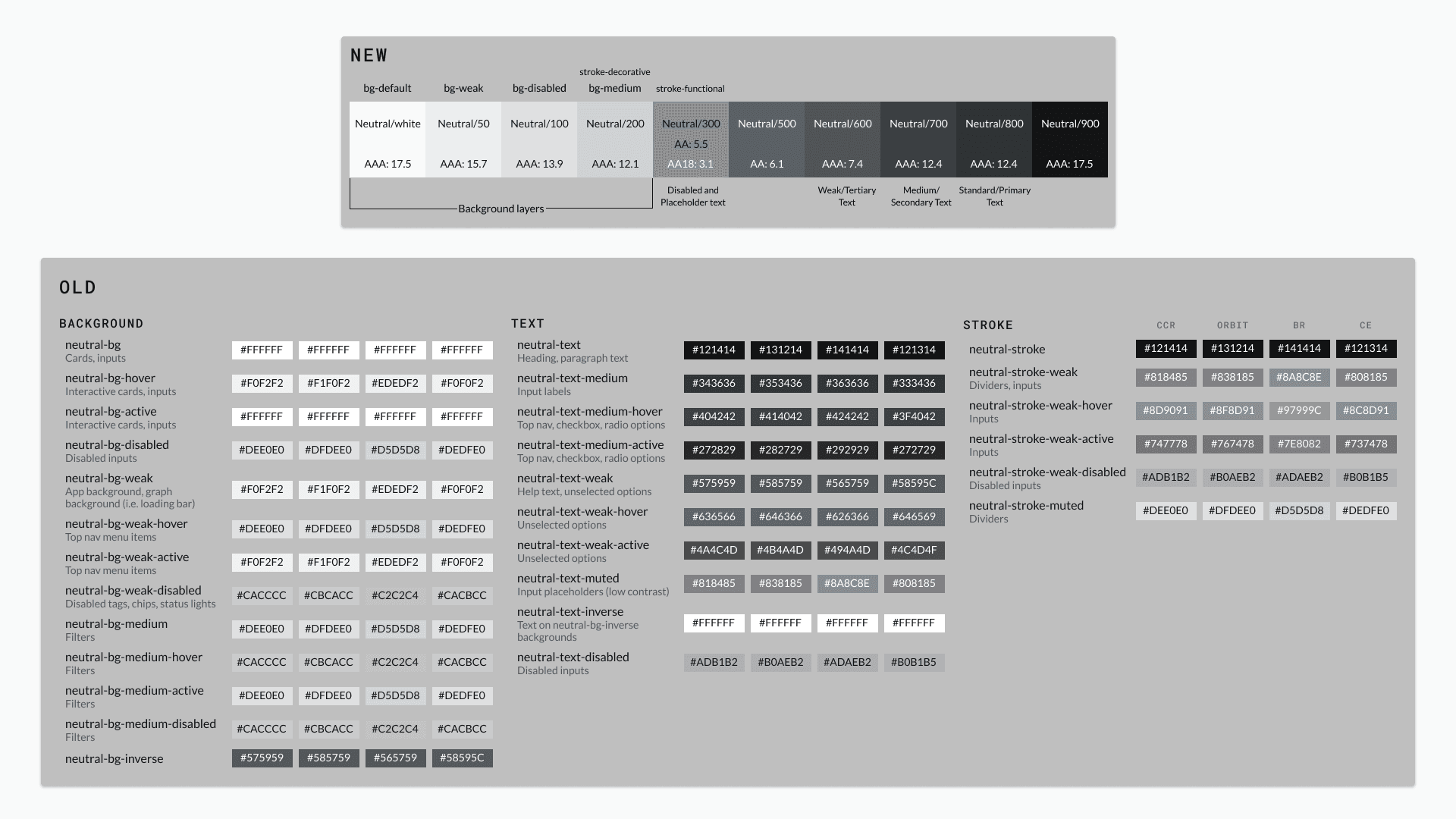
The existing design system had over 300 colors that had very little differentiation between them. Each business unit had their own colors despite not having the need for distinguishable applications. It made it very difficult to design and implement consistently styled features. Our company was also going through a rebrand with new colors at the time, so I felt like it was the perfect time to revamp our palette.

I started by gathering all the required brand colors that we needed for navigation bars and looking for any similarities in suggested neutral colors. I identified a color that worked with every brand and then generated a color scale for the rest of our neutrals. I took the generated colors and adjusted to fit with our business unit brand colors. I also ensured that when used together for backgrounds and foregrounds they had enough contrast to pass at least WCAG AA guidelines.

The result was 10 neutral colors that worked for primary, secondary, and weak background and foreground colors. These colors accomplished better contrasting, seamless palette than the previous 80 did.

Image showing the new, smaller color palette on top and the old, complicatied palette on the bottom

Color Variables

Figma variables were just announced as I was building this design system. I had experience using CSS variables so this was really easy to learn and understand. I created a system for foundation colors and semantic colors; the latter being the only variables exposed to designers and developers. To further optimize the color implementation, I devised a system for specific class colors, such as text, background, and stroke. By configuring the variables in a way that only displays the relevant color options when selecting certain frames, I facilitated the quick identification of the appropriate color class for text, background, stroke, etc. application in both design and code.

A screenshot of the Figma variables panel showing the grouping system I created

Components

All components were rebuilt with auto-layout, variants for different interactive states, properties, documentation, and a link to Coda with our expansive documentation

Table Component

The most challenging component to build was the table. Tables are built using many different atoms and molecules: cells, columns, headers, and pagination just to name a few. The table also had to support many different types of cells and cell heights.

I came up with a solution that uses 5 main components that solve all of the challenges when building a table. These components are broken up to easily identify and bulk update different parts. You can easily update a whole column to display a tag, update the row heights for all cells to allow 2 lines to display, or adjust the table to show a different amount of records.

Impact

The system transformed how our teams worked:

  • Designers could build features faster and with fewer errors

  • Developers implemented features directly from coded components, drastically reducing implementation and QA time

  • New team members and non-designers could use the system confidently thanks to documentation and guidelines

  • Stakeholders reported more consistent, higher-quality products across business units

Key metrics:

  • Reduced the number of colors from ~300 to ~50, consolidating across business units while maintaining brand integrity

  • Merged 5 Figma files into 2, decreasing clutter and file size by 70%

Reflection

Leading this project fresh out of college taught me the power of ownership, structured decision-making, and documentation. I’m proud that the system is scalable, easy to use, and widely adopted.

If I were to rebuild it today, I’d implement additional QA checkpoints at the end to catch small bugs before launch but the feedback system I created ensured continuous improvement. Most importantly, I learned that a design system is more than a library of components; it’s a tool for clarity, efficiency, and empowering teams to create better products.

There are many more details on this effort. Please reach out if you have any questions!

Read Case Study

Media Client Portal

A snapshot of a the channels dashboard page in a media client portal

I redesigned a media client portal that allows clients to manage and view information about their sites, channels, virtual machines, and events affecting their assets. This project involved consolidating two outdated systems into a unified, scalable solution that serves multiple client types with different needs.

My Role

I worked as the lead UX designer alongside our media team stakeholders and developers over a 5 month timeline. I took over the project after another designer had created an initial solution that was too complex and didn't address actual user problems.

The Problem

Technical Debt

Our media clients were struggling with two separate, outdated systems that were several years old, incredibly difficult to maintain, and had inconsistent interfaces with unreliable data. Worse yet, we could no longer support these applications with our current technology stack which forced us to rebuild.

Band-Aid Features

One of the systems had been originally built for a single client, then modified over years to serve multiple clients. This created a patchwork of features that didn't serve anyone well. Each new client requirement resulted in another workaround rather than a thoughtful solution.

Business Model Shift

Our company was also transitioning to start providing single assets to multiple businesses, meaning we needed a system that could elegantly show complex relationships between all of the potential assets, which is something the old systems couldn't handle.

Research and Goals

Researching Through Internal Stakeholders

Since I couldn't access end users directly, I conducted interviews with our internal team members who interact with clients daily. This revealed two distinct user groups: account managers who needed high-level portfolio overviews, and technical users who required detailed asset information and relationship mapping.

Design Goals

Based on the insights I gathered through research, I established clear success criteria:

  • Create consistency across all asset views so important information is quickly identifiable

  • Build holistic connections where all assets (sites, channels, VMs) are clearly linked and relationships are visible

  • Surface critical event information including upstream/downstream impact during outages

  • Serve multiple user types with appropriate levels of detail for each audience

  • Support multiple clients with configurable features and responsive design

My Process

I began with a comprehensive research and audit of the existing designs and user needs, identifying what was salvageable and what needed complete rebuilding by working closely with the media team. From there, I broke the solution into phased development cycles, organizing main features into manageable sprints that could be tackled incrementally.

A whiteboard showing a monthly breakdown of work planned. Some parts are blurred because of proprietary information

For each phase, I created high-fidelity wireframes and established feedback loops with the team before any development handoff, ensuring alignment and catching issues early. As we built and learned more about the holistic system needs, I continuously iterated on the designs, refining the experience based on real implementation challenges. Throughout this process, I maintained multi-client considerations by creating wireframe variations that showed how features could be displayed or hidden for different client needs, complete with detailed annotations for responsive behavior.

The Solution

Dashboard and List Pages

I created a centralized dashboard that gives account managers immediate visibility into their entire asset portfolio with key metrics and status indicators at a glance. Another feature is that the graphs are clickable which will take the user to the corresponding list page with the correct filters applied.

Detailed Asset Pages

I created detail pages that serve both of our defined user types simultaneously by combining technical specifications for power users with visual charts and graphs for account managers. Information hierarchy ensures each audience can quickly find what they need.

Comprehensive Event Management

Solved the critical challenge of event visibility by:

  • Separating outages and maintenance into distinct categories and pages

  • Adding event columns and history to each asset/details page

  • Surfacing vital information including NOC team activity logs

  • Showing impact relationships with charts about affected assets

  • Enabling direct communication with NOC teams through messaging features

Results and Impact

The new portal delivered measurable improvements:

  • Increased user engagement across the client portal

  • Successful onboarding of new clients into the unified system

  • Improved willingness of users to interact with our portal for asset information, event management, and team communication

  • Consolidated experience eliminating the need to use multiple outdated systems

Learnings and Reflection

This project taught me how complex media infrastructure relationships really are; understanding how sites connect to markets, channels, and VMs was crucial for designing intuitive information architecture. I also grew significantly in stakeholder collaboration and learned to present design decisions effectively to technical teams.

If I had to do things differently, I would have pushed harder for direct user research opportunities earlier in the process. While internal stakeholder interviews were valuable, getting client feedback during the design phase would have validated assumptions more quickly and potentially uncovered insights we missed.

Read Case Study

Experience

Experience

UI/UX Designer

  • Own all product design as the sole UX designer across 9 platforms: Web, iOS, Android, AndroidTV, tvOS, FireTV, Roku, Samsung, and LG

  • Designing native mobile experiences; applying platform-specific interaction patterns, adapting touch targets, and seamless content discovery in a FAST product

  • Mastering 10-foot TV experiences; accounting for D-pad navigation, focus state systems, and typography legibility

  • Building Zeam's design system from scratch and established a token distribution pipeline using Style Dictionary to deliver platform-specific variables

  • Ideating and mapping out new app features to modernize Zeam's OTT platform

  • Producing implementation documentation and handoff processes that enable engineers to build directly from Figma and Jira utilizing AI tools and MCP servers

Zeam

11 / 2025 - Present

User Experience Designer

  • Led widespread adoption of an atomic design system for new development projects with a focus on developer and design consistency; defined interaction and design standards to drive consistency within UX team

  • Reduced Figma design system file size by 70% by refactoring components & eliminating redundant features, streamlining DesignOps & speeding up time to deliver new design work from junior designers

  • Had a leading role in code implementation of design system via React & Storybook, ultimately enhancing developer experience when constructing frontend UIs

  • Drove end-to-end design process from initial discovery workshops through final design handoff and QA reviews, ensuring seamless collaboration between design and development teams 

  • Championed UX best practices during sprint planning and design reviews, successfully advocating for user-centered solutions and helping teams prioritize user needs over technical convenience

  • Established foundational UX workflows, documentation, and design patterns that standardized processes across multiple business units, reducing design inconsistencies and accelerating project delivery

  • Spearheaded foundational design research and development by conducting comprehensive audits, identifying system gaps and inconsistencies, and collaborating cross-functionally to establish unified design principles that increased team productivity and efficiency

  • Designed and launched a platform enabling media business clients to holistically manage and monitor their hardware and digital assets

  • Ensured solution alignment to customer/user needs through the creation of user flow diagrams and information architecture documentation

  • Partnered cross-functionally with multiple business units across the media and telecommunication industries to align design solutions with diverse stakeholder requirements and technical constraints

CCR Technologies

07 / 2023 - 11 / 2025

User Experience Design Intern

  • Conducted accessibility and design audits of F&G’s internal and external websites

  • Researched design systems and accessibility guidelines in preparation for creating F&G’s own design system

  • Designed and launched F&G’s first design system in less than 6 months

F&G

03 / 2022 - 12 / 2022

Contact

If you've got something that I can help with or want to say hi, write me at blakefisher24@gmail.com.

Contact

If you've got something that I can help with or want to say hi, write me at blakefisher24@gmail.com.

Contact

If you've got something that I can help with or want to say hi, write me at blakefisher24@gmail.com.

Designer and crafter of digital solutions.

Designer and crafter of digital solutions.

Designer and crafter of digital solutions.

Create a free website with Framer, the website builder loved by startups, designers and agencies.